3 October 2026 · TikTok Ban Service · 13 min read
How to recover a TikTok account: name the lockout, then use the screen TikTok built for it
How to recover a TikTok account depends on what still connects you to it. If a code can reach your email or phone, tap Forgot password? on the login screen. If neither works, open Help, then Recover your account, and use friends verification or a Need more help? request. TikTok publishes no phone number for any of this.
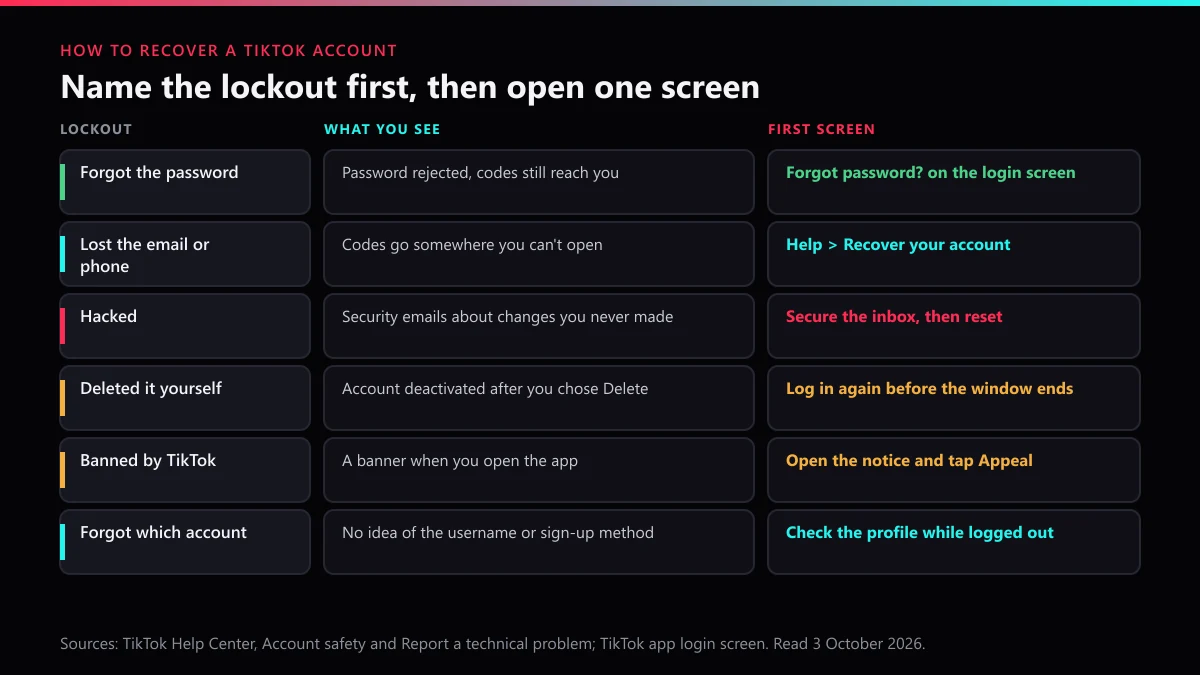
Most advice on this topic is one list of steps. That list only fits one kind of lockout. A person who forgot a password, a person whose email was swapped by a hacker and a person whose account TikTok banned all search for the same words, and each of them needs a different screen. Picking the wrong one is how a ten-minute fix turns into a week of silence.
We wanted to see what a locked-out owner actually meets, so on 3 October 2026 we went through TikTok's Help Center logged out. The Account safety page ends with a "contact us" link, and it opens the same web form TikTok uses for every kind of problem. Next to it sits a Chat with us button that opens a support bot. Its answers carry an AI-generated label. Nowhere on the way did we meet a phone number.
You have plenty of company. Action Fraud received 35,434 reports of social media and email hacking in 2024, up from 22,530 the year before, and that is only the UK and only the hacks.
Which kind of TikTok lockout do you have?
Name it from what your screen shows, because each lockout has its own door. People ask it a dozen ways: recover my TikTok account, how? Where is the page? Who do I call? If your search was closer to "TikTok, my account, recovery" than to a full question, start with the row below that matches your screen.
| Lockout | What you see | First screen | Full guide |
|---|---|---|---|
| Forgot the password | Password rejected, codes still reach you | Forgot password? on the login screen | password reset, step by step |
| Lost the email or phone | Codes go to an inbox or number you can't open | Help, then Recover your account | recovery when the number is gone |
| Hacked | Security emails about changes you never made | Secure the inbox, then reset | what the hacker changed |
| Deleted it yourself | Deactivated after you chose Delete | Log in again inside the window | who deleted it decides |
| Banned or suspended | A banner when you open the app | Open the notice, tap Appeal | the appeal clock |
| Forgot which account | No username, no idea how you signed up | Check the profile while logged out | finding an old account first |
Business owners have one more layer: an ads, Shop or LIVE restriction can sit on top of a personal login that works fine. That case has its own business account recovery guide.
Where is TikTok's account recovery page?
It isn't one page. TikTok splits the TikTok account recovery page into three places, and which one you need depends on whether you can still receive a code.
The first is the login screen itself. Tap Forgot password? in the app or on the website and TikTok offers to send a code to the email or the phone number on the account. The second lives in the app only. Tap the Help button at the top of the login screen, then Recover your account, and you can search for the account by username or email, or tap Search by phone number. That TikTok recover-an-account search is where friends verification and the Need more help? request start.
The third is reading, not a form. TikTok's Account safety page in the Help Center explains friends verification, how to reset a lost authenticator, and how to contact TikTok about banned accounts. When people ask for "the recovery page", that article is the closest thing TikTok has to one, and it is worth five minutes before you send anything.
How do I recover a TikTok account if I forgot my password?
Reset it with a code. On the login screen tap Forgot password?, choose email or phone, and enter the code TikTok sends. Set a new password and you are in. TikTok's Account safety page notes that once you update a password, "you'll be logged out of all other devices", which also closes any session you didn't start.
Two things can block that simple path. If 2-step verification is on and you're on a new phone, TikTok asks for a one-time code before it lets the device in; a phone or tablet where you ticked remember this device gets through more easily. And if you set up a passkey, you may not need the password at all. TikTok says a passkey lets you log in "from any device that is also signed in to your Apple ID or Google account".
Our password recovery guide covers the unrecognized-device error in detail. The short version: try the reset from the device you use most before you try anything else.
What should you do when the verification code never arrives?
Check the address, then the inbox, then the number format, in that order. Missing codes are the most common reason a simple reset stalls, and TikTok's own support bot has a set answer for them.
When we opened Chat with us from the Help Center, the bot asked us to pick an issue type: Account, LIVE, Interaction, Traffic, Post, Feed, Monetization or Other. We chose Account. It offered four common questions, including "I am not receiving my phone or email verification code". We picked that one, and the reply, labelled AI-generated, came down to this list:
- Select the correct country code for your phone number.
- Type the number without the country code and without a leading 0.
- Restart the phone, then request a new code.
- Check the email address for typos or stray spaces.
- Look in spam and other folders, and make sure the inbox isn't full.
- Request the code again once those are fixed.
The bot closed with a line that explains a lot of confusion: one phone number or email "can only be linked to one account". If you made a second account with the same email, the code goes to whichever one holds it. Keep the label in mind too. The chat window warns that mistakes are possible, so read its answer as a checklist rather than a ruling on your case.
How can I recover my TikTok account without email or phone number?
Prove it another way: with friends, with an old device, or with a request TikTok reviews by hand. How can I recover my TikTok account without email or phone number? Go to Help, then Recover your account, search by username, and on your account page tap Can't access these?.
From there, Ask friends to verify is the quickest choice if you have the friends for it. TikTok needs at least two friends you are connected with, they get "a specific period of time" to approve, and you can only ask a limited number of times a day. Pass, and TikTok says you'll be logged in automatically. Message both friends first so they are ready.
No friends to ask? Use Need more help? and give the details that match the account's past: the old email, the old number, earlier passwords, the phone you posted from. If what you lost is an authenticator app and its recovery code, the same button starts an identity check that TikTok says "may take up to 30 days". The full case list sits in our guide to recovery without the phone number.
How do I recover my TikTok account if it was hacked?
Take back the inbox first, then the TikTok login. How do I recover my TikTok account if it was hacked? Follow this order:
- Change the password of the email account TikTok sends codes to, and sign it out everywhere else.
- Keep a screenshot of each security email TikTok sent you, with its date, before anything gets deleted.
- Try Forgot password? while the code still reaches you.
- If the hacker changed the email and phone, file one request through TikTok's Report a problem form, whose first topic is Account access / security.
The form needs no login, so you can file from a laptop and give an inbox the hacker never touched. Send it once, with everything in it. Two pages here go deeper: one on working out what the hacker changed, and one that ranks the fastest routes back after a hack.
How do I restore a deleted TikTok account?
Log back in before the deactivation period ends. How do I restore a deleted TikTok account? If you deleted it yourself, TikTok's deletion screen gives you 30 days, and signing in during that time cancels the request. After that window, we found no restore route anywhere in the Help Center.
If TikTok removed the account, you aren't restoring a deletion. You're appealing a ban. TikTok's Account safety page says a banned owner sees "a banner notification" the next time they open the app; open it and tap Appeal. Our guides to a permanently banned account and to telling a deletion from a removal walk through both.
An account you simply stopped using hasn't been deleted at all. Under TikTok's Inactive Account Policy, an account left unused for 180 days or more may have its username reset to a random number, so search for it by email or phone instead of the old @name. And if you get back in and decide to leave on purpose, read how to close a TikTok account properly first, so the 30 days work for you next time.
Is there a TikTok account recovery page or a number to contact TikTok account recovery?
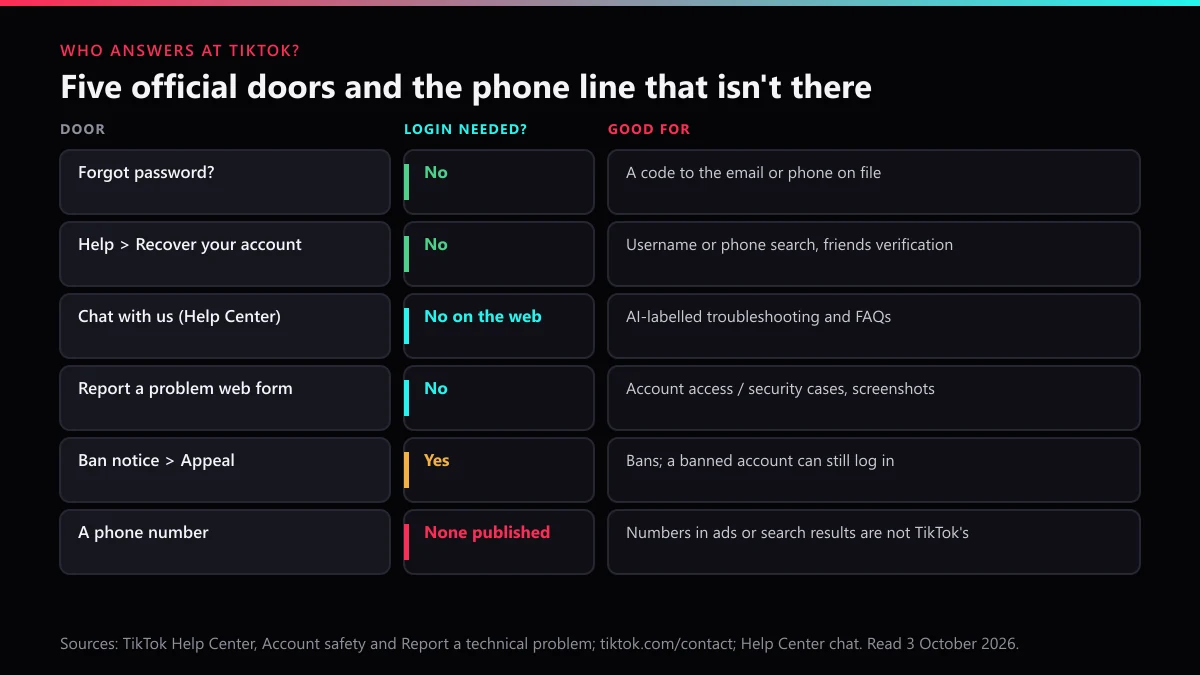
No phone number exists for it; the recovery screens and one web form are the whole list. Is there a TikTok account recovery page or a number to contact TikTok account recovery? TikTok's contact page sends users to the Help Center and a set of web forms. The Help Center adds one blunt line: "Only the TikTok Support team can assist with your requests."
| Way to contact TikTok | Login needed? | Use it for |
|---|---|---|
| Forgot password? on the login screen | No | Codes to the email or phone on file |
| Help, then Recover your account (app) | No | Username or phone search, friends verification |
| Chat with us in the Help Center | No on the web | Troubleshooting answers labelled AI-generated |
| Chat with us in Settings and privacy, Help Center | Yes | Reporting a problem from the right account |
| Report a problem web form | No | Account access cases, with screenshots |
| Ban notice, then Appeal | Yes | Bans; a banned account can still log in to appeal |
Anyone offering to contact TikTok account recovery for you by phone is outside that list. The FTC warned in 2020 that scammers set up fake customer service numbers and pay for them to show up in your search results (FTC consumer alert). The BBB issued a similar scam alert in February 2025 about fake support accounts on social media. TikTok's own phishing page says it will never ask for your password or verification codes.
How long does it take to recover my TikTok account?
From a few minutes to about a month, and only some routes have a published clock. How long does it take to recover my TikTok account? It depends on the door:
- Code reset: minutes, once the code lands.
- Friends verification: as long as your friends take, inside the window TikTok gives them; a pass logs you straight in.
- Lost authenticator, no recovery code: "may take up to 30 days", per the Account safety page.
- Report a problem request: TikTok publishes no review time.
- Ban appeal: no published decision time for adult accounts.
- Your own deletion: 30 days to change your mind.
Third-party guides quote anything from a day to two weeks for the review, but none of them cites TikTok. The parts you control are speed of reply and consistency. Watch the contact inbox, answer in the same thread, and don't file the same request three times with three slightly different stories.
Should you pay someone to recover your TikTok account?
No, and doing so can break TikTok's rules. TikTok's Terms of Service say in section 3.2: "Do not give others access to your account". A paid recovery agent needs exactly that access, and every route above is free. We looked at the market for this in our page on who can really get you back in and in the unban service explainer.
The same sellers often offer revenge on whoever hacked or reported you. Read what paid account removal really buys before spending anything. Whether it is sold as an automated account report bot, a mass report bot or a spam reporting bot, the pitch rests on a report count that supposedly deletes accounts. Our breakdown of what a mass report tool does once you pay shows why, and nobody can delete someone else's TikTok on request.
What can you report while you are still locked out?
Anything posted outside your own account, because none of it needs your login. Lockouts and hacks often come with a copycat profile next door. Start with reporting a fake account that uses your photos, and see why mass reports against an impersonator backfire before friends pile in.
If your videos turn up on another profile, begin with reporting stolen TikTok content, or send a formal copyright takedown notice for clips you own. For a scam page, decide whether to report the whole account or one video; reporting a single TikTok video covers the narrower case. Picking the violation category that fits matters more than volume, and the screens for submitting a report show each tap.
Threats, or demands for money to hand the account back, belong in TikTok's harassment report route and with the police. If someone opened a shop in your name, see getting a fake TikTok Shop removed. If your old handle was taken while you were out, read about claiming a TikTok username back.
Set expectations before you push. How fast TikTok really removes things and what actually gets an account banned explain the limits. Where a copy plainly breaks the rules, an evidence-based TikTok account takedown is the work we do; send us the profile links and say what the account is doing. The rest of our guides are in the TikTok solutions index, and the TikTok Ban Service home page explains what we take on and what we refuse.
FAQ
Can I recover my TikTok account after the deletion period ends?
Not through any TikTok screen we could find. Logging back in during the deactivation period shown when you delete is what cancels a deletion. Once that period runs out, the Help Center offers no restore route, so the safe move is to act inside the window.
Does TikTok have a phone number for account recovery?
No. TikTok's contact page lists the Help Center and a set of web forms, and none of TikTok's support pages we read prints a phone number. A number that turns up in a search ad or a forum post belongs to someone else, so don't call it or give it your login.
Can I recover a TikTok account with just the username?
The username gets you to the right account. In the app, Help then Recover your account lets you search by username, but you still need a way to prove it is yours afterwards: a code, a trusted device, two friends who verify you, or a Need more help? request.
Will the TikTok Support chat log me back in?
When we tried it on 3 October 2026, it answered with an AI-generated checklist for missing verification codes and a list of common questions. It points you to the same screens described here; treat it as a fast troubleshooter, not a person reviewing your case.
Can I recover my TikTok account on a new phone?
Yes, as long as a code reaches your email or phone. With 2-step verification on, TikTok asks a new device for a one-time code, so a phone you used before is often the easier place to start. A passkey saved to your Apple ID or Google account also works on a new device signed in to it.
What if I signed up with Google or Apple?
Then your way in is that Google or Apple account, not a TikTok password. Recover that account first through Google or Apple, then tap the matching Continue with button on TikTok's login screen. A TikTok password reset won't help if the account never had one.
Why does TikTok say my email is already linked to another account?
Because one email or phone number can only be linked to one TikTok account. If you once made a second account with the same address, codes and resets go to whichever account holds it now. Log in to that other account, free the address, then try the recovery again.