28 September 2026 · TikTok Ban Service · 11 min read
TikTok account recovery after being hacked: find the door they left open
For TikTok account recovery when hacked, first try Forgot password? with your own email or phone. If the hacker changed both, go to the app's login screen, tap Forgot password?, then Recover account. On a PC, use TikTok's no-login web form: Account access / security, then Hacked account.
Nearly every guide to a hacked TikTok starts with "reset your password". That advice only helps when the hacker was lazy and left your email and phone alone. Everyone else is standing at a login screen that sends codes to an inbox they no longer own.
So this page runs the other way round. It starts from what the hacker actually changed, because that is what decides which of TikTok's doors is still unlocked for you. TikTok's own page on a hacked account lists four signs: a changed password or phone number, a new username or nickname, videos deleted or posted without you, and messages you never wrote. Any one of them means you should act today, not wait to see whether it happens again.
The stakes are wider than one profile. The US Federal Trade Commission said on 27 April 2026 that people reported losing $2.1 billion to scams that began on social media in 2025, nearly 30% of all reported losses, and it named hacking a user's account as one of the ways those scams start (FTC data release). A stolen TikTok with your face on it is a trusted sender to everyone who follows you.
What did the hacker change, and which way back in does it leave?
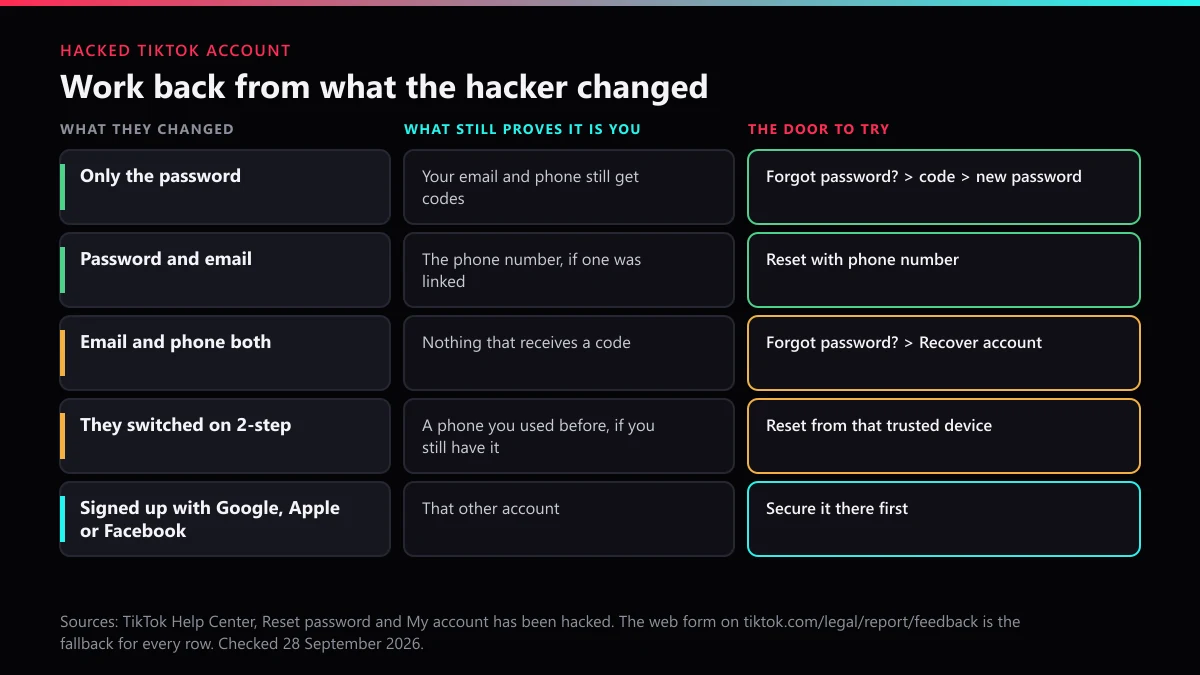
The answer sits in your login screen. Try to sign in, then tap Forgot password? and watch where TikTok offers to send the code. That one screen tells you which of five situations you are in.
| What the hacker changed | What still proves it is you | Route to try first |
|---|---|---|
| The password only | Codes still reach your email and phone | Forgot password?, enter the code, set a new password |
| Password and email | The phone number, if you had linked one | Reset with phone number |
| Email and phone number | Your memory of the old details and old passwords | Forgot password?, then Recover account |
| They turned on 2-step verification | A phone or tablet you used to log in before | Reset from that trusted device |
| Nothing: you signed up with Google, Apple or Facebook | That other account | Secure the Google, Apple or Facebook account first |
The last row catches people out. TikTok's reset password page says that if you joined with another social account, the password has to be reset on that platform. If your Google account was the thing that fell, fixing TikTok first is pointless; the attacker simply walks back in through Google.
Why does the reset stop at an "unrecognized device" error?
Because 2-step verification is on and you are resetting from a phone TikTok has never seen you log in on. TikTok built that block on purpose. Its help text explains that it stops someone resetting your password even if they have your email or phone, which is exactly the protection a hacker switches on after taking an account.
Two ways through it are documented. The first is to find an old device: the phone you used before you upgraded, a tablet in a drawer, a family member's handset you once signed in on. A trusted device can reset the password normally. The second is the account recovery request, covered next. Before you factory-reset or sell an old phone, sign in on it once more if you can; it may be the only trusted device left on a hacked account.
One more detail matters here. If you had set up 2-step verification yourself with an authenticator app and lost it, the fix is a separate one: Can't access the app, then the recovery code you saved, and if that is gone too, an identity check that TikTok says may take up to 30 days.
How do you file the Recover account request so a reviewer can match you?
Answer with details only the real owner would know, and give them as they were before the hack. The request lives behind the same button as the reset:
- Open the TikTok app and go to the login screen.
- Tap Forgot password?, then Recover account.
- Follow the identity steps. TikTok says it may ask for your registered email, phone number or previous passwords.
- Give the email and number that were on the account before the hacker touched it, not the ones you use today.
- List every old password you can remember, in the order you used them.
- Wait for Support to reply, and keep checking that email's spam folder.
A second route exists for people who still have friends on TikTok. From the Help button on the login screen, Recover your account, then Can't access these? leads to Ask friends to verify. It needs at least two friends you are connected with, and they approve from their own Security & permissions page.
Whichever you choose, do it once and do it carefully. Several rushed requests with slightly different answers only hand the reviewer conflicting facts to match against your account.
Can you recover a hacked TikTok account on PC?
Partly. A desktop browser gives you two tools, and the gap between them matters. The login page's password link opens a Reset password screen that sends a code to an email address, or by SMS if you switch to the phone option. If the hacker replaced both, that page has nothing else to offer.
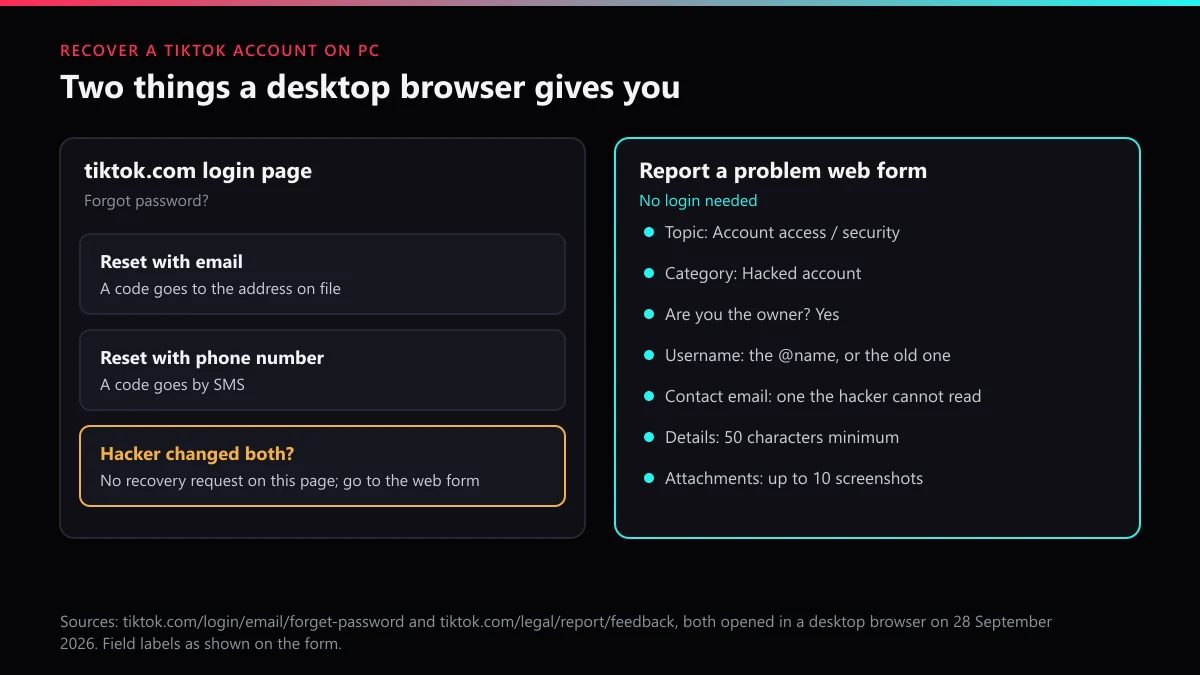
The second tool is the one to use from a computer. TikTok's Report a problem web form opens without logging in. When we walked through it on 28 September 2026, the Topic list had twelve options; choosing Account access / security and then the category Hacked account produced these fields:
- Are you the owner of the hacked account? Yes or No. Answer Yes only for your own account; a friend helping should still file as the owner, from the owner's email.
- Username. The @name. If the hacker renamed it, give the old one and mention the new one in the details.
- Contact email. The placeholder suggests an email, a phone or a sign-in like Apple or Google. Pick an inbox the hacker has never had.
- Additional details. At least 50 characters. Include the date you lost access, what changed, the old email and number, and the phone model you normally use.
- Attachments. Up to 10 screenshots, in formats from JPG and PNG to ZIP. The best one is the security email that told you your details had changed.
The form then asks you to confirm that everything is true. That declaration is worth taking literally: a clean, specific first submission reads better than a string of follow-ups.
What should you do in the first hour after getting back in?
Throw the hacker out properly, in an order that stops them coming back while you work. Change the password before anything else, because TikTok signs every other device out the moment it changes.
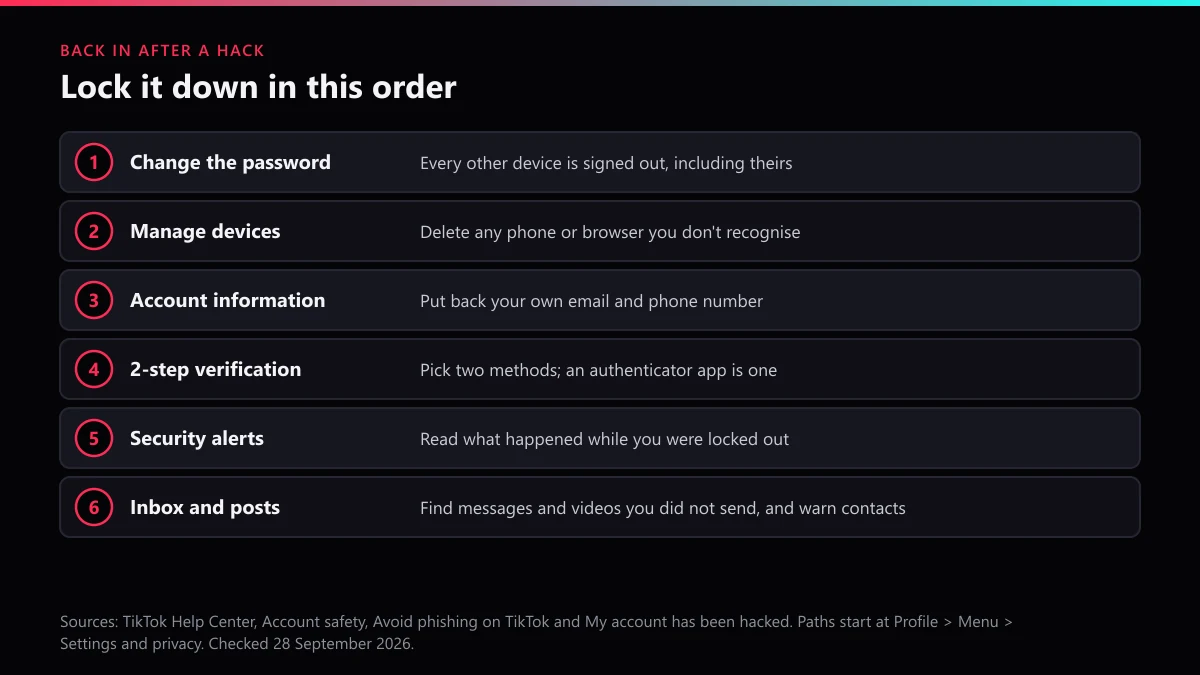
- New password. TikTok's security page suggests 12 to 15 characters, not reused anywhere else. If you used the old one on other sites, change it there too.
- Manage devices. Under Settings and privacy, then Security & permissions, delete any device you don't know.
- Account information. Put your own email and phone back, so the next reset code comes to you.
- 2-step verification. TikTok asks you to pick at least two methods: phone, email, an authenticator app, or password. A passkey is also offered.
- Security alerts. Read the log. The security checkup treats 30 days without unusual activity as clean; anything inside that window is worth a screenshot.
- Inbox and profile. Scroll your sent messages and posts for anything you didn't write, delete it, and tell the people who received it.
TikTok's phishing page puts the most useful sentence in plain words: "TikTok will never contact you to ask for your password, verification codes, or other sensitive personal information." Hold every message you get in the next few weeks to that line. Whoever had your password once has every reason to try again, this time dressed up as support.
Can you trust Reddit threads on hacked TikTok account recovery?
Trust the parts that match TikTok's documented routes and ignore everything that asks for money or codes. We tried to count recent r/Tiktokhelp threads for this page, and the Reddit archive we use turned both of our queries away, so there are no thread numbers here. What we can say is how to read a thread quickly.
Good replies point you to Forgot password?, Recover account, the web form or a trusted device, and tell you to wait for the reply email. Bad replies arrive fast, from accounts with no history, promising a "recovery expert" or a contact who "works at TikTok". Nobody outside TikTok can open your account. Someone who asks for your remaining passwords or a code is the second hack, not the fix.
The same goes for comments selling services that promise to delete the hacker's new account. Before you spend anything, read what paying for TikTok account removal really buys, and why there is no magic number of reports that deletes an account. The offers usually come down to a mass report tool that does less than it claims, sold under names like an account report bot, a TikTok mass report bot or a spam report bot. None of those gets your account back.
What if the hacker used your TikTok to scam people or got it banned?
Separate the two problems: your account, and the damage done under your name. For a ban, you need to be back inside first, because TikTok's appeal starts from the ban notice in the app. In the appeal, say the violations were posted while the account was hacked and give the dates from your security alerts.
The damage often spreads to new accounts. Hackers who lose the original sometimes rebuild it next door, with your photos and a lookalike name. That is a job for TikTok's reporting tools, not for recovery forms:
- A lookalike profile: report a fake TikTok account using your identity, and read why impersonation cases go better without a report pile-on.
- Your videos reposted: report stolen videos on TikTok, or send a formal TikTok takedown notice for copyright.
- Single scam posts: flag each scam video on its own, or see when to report the whole account instead of one video.
- Threats or blackmail from the hacker: the harassment report route on TikTok.
- A Shop opened under your name: removing a rule-breaking account or TikTok Shop.
- Your old @name taken while you were locked out: how to claim a TikTok username back.
Pick the right category when you file; matching the report to the violation matters more than volume, and the step-by-step on submitting a TikTok report covers the screens. If the copy is doing real harm today, read what "taken down immediately" can realistically mean, and how an account gets banned through legitimate reports. If you decide the recovered account isn't worth keeping, there is also deleting your own TikTok account for good; and no, nobody can delete someone else's TikTok directly.
Where the copy clearly breaks TikTok's rules, a TikTok account takedown built on evidence is what we do. You can send us the copycat's profile link, browse every TikTok reporting and removal guide we publish, or start from the TikTok Ban Service home page.
FAQ
Can I recover a hacked TikTok account if the email and phone number were both changed?
Often, yes. On the app's login screen tap Forgot password?, then Recover account, and answer with the email, phone number and old passwords you used before the hack. From a computer, file the Hacked account web form instead. Neither route needs the details the hacker now controls.
How long does TikTok take to answer a hacked account request?
TikTok publishes no time for the Recover account request; its Help Center only says Support will review it and get back to you. The one clock it states is for losing an authenticator app, where the identity check may take up to 30 days. File once, then watch the contact email.
Will changing my TikTok password kick the hacker out?
Yes. TikTok says a new password logs the account out on every other device, so anyone signed in has to log in again with the new one. Delete unknown entries under Manage devices straight after, and check that the email and phone in Account information are yours.
Is it safe to pay someone who offers to recover my hacked TikTok?
No. Only TikTok can hand an account back, and it does so for free through the app and the web form. A stranger who asks for a fee, your verification codes or your remaining passwords is asking for exactly what TikTok says it will never ask you for.
The hacker got my TikTok banned. Can I still get it back?
Get access first, then appeal. TikTok's ban appeal starts from the ban notice inside the account, so you need to be able to log in to use it. Say in the appeal that the violations were posted while the account was hacked, and attach the dates from your security alerts.
Can I report the hacker's new account that copies mine?
Yes. Report the copy from its profile under impersonation, and keep the link to your real account ready. A copycat that uses your name and photos to collect money or messages breaks TikTok's rules on its own, whether or not you ever get the original back.