22 September 2026 · TikTok Ban Service · 12 min read
How to report a TikTok account or video and get it deleted, and what actually triggers a ban
No number of reports gets a TikTok video or account deleted. TikTok removes a video when review confirms it breaks a Community Guideline, and bans an account after one severe violation or repeated strikes, which expire after 90 days. So report the exact post or profile under the rule it breaks. The only instant ban is one you apply yourself.
Ask a forum how many reports it takes and somebody will give you a number. In a July 2026 thread on Redact's community forum, one reply said forty to fifty reports used to work and no longer does, while another suggested five to ten per post. Neither cited anything, because TikTok has never published a threshold, and its own enforcement data points somewhere else entirely.
Both replies were guesses. The number that matters is the rule a video breaks.
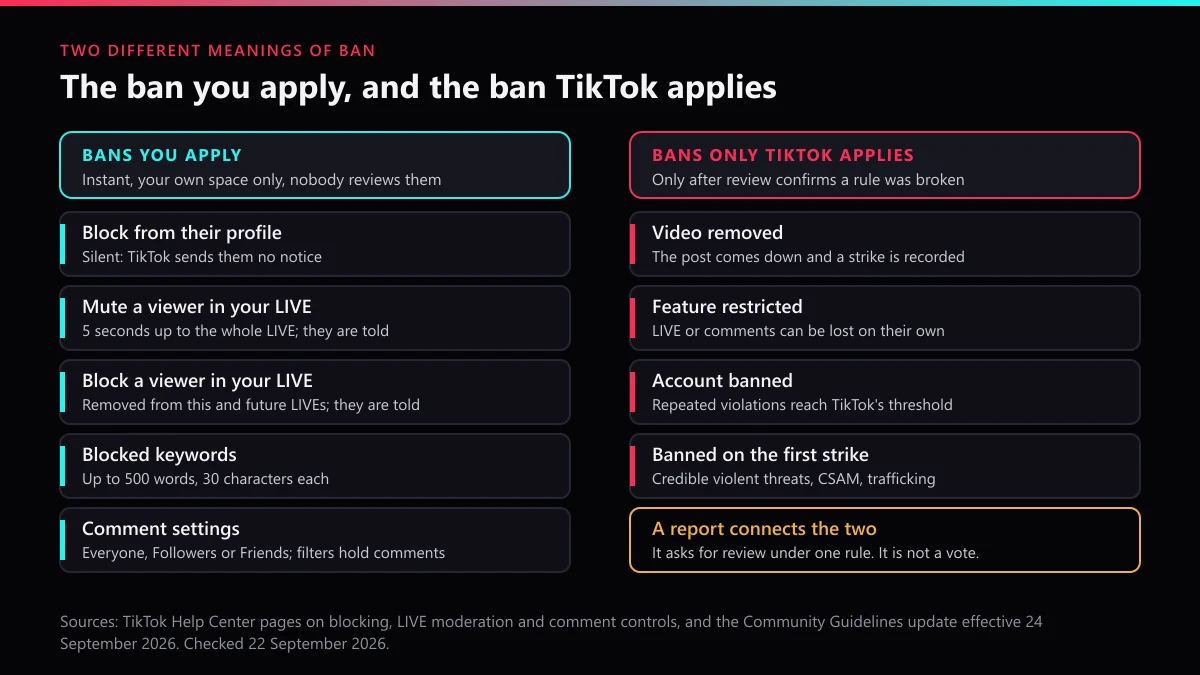
The word ban causes the rest of the confusion. Half the people typing how to ban someone on TikTok want the block button, and the other half want TikTok to delete an account, which are two mechanisms with two different owners. This page takes them in that order: what makes TikTok remove a video or end an account, then the bans you can apply yourself on your profile, in your comments and inside a LIVE.
How many reports does it take to take a TikTok account down?
One accurate report can be enough, and a thousand inaccurate ones are not, because TikTok reviews the content a report points to instead of counting the people who sent it. Its safety team put that on record on 9 July 2021: "mass reporting content or accounts does not lead to an automatic removal or to a greater likelihood of removal by our Safety team", a line from a TikTok Newsroom post that is still live five years on.
The enforcement numbers show where the decisions actually happen. Between January and March 2026, TikTok removed 184,012,576 videos, and 178,014,154 of those were taken down by automated moderation. Its dashboard puts the proactive rate for the quarter at 99.3%, which TikTok defines as finding and removing a video before anyone reports it. Reports still matter for what is left and for the borderline cases a system hands to a person, but they act as a pointer to content, never as a vote on it. That is the honest reply to how many reports to take a TikTok down: one, filed under the right rule. The counters on report bots measure something else entirely, which a line-by-line teardown of a report bot makes plain.
Speed follows the same logic. For videos TikTok removed after a user report that quarter, 96.2% came down within two hours of the report and only 0.2% took longer than a day, according to the response-time chart in its Community Guidelines Enforcement Report. A report about a real violation tends to land fast. One about content that breaks nothing does not land at all, however many copies arrive.
Removal is not the last word either. The same report counts 8,838,710 videos restored in the quarter, so a video that vanishes today can come back when its uploader appeals and wins.
What gets one TikTok video deleted, and what ends the whole account
A video goes when review confirms it breaks a rule. An account goes when the violations behind those removals hit a ban trigger, and the Accounts and features rules in TikTok's Community Guidelines name them: "Repeated rule violations", "A single, severe violation", "Trying to avoid enforcement", plus accounts that exist to break the rules in the first place.
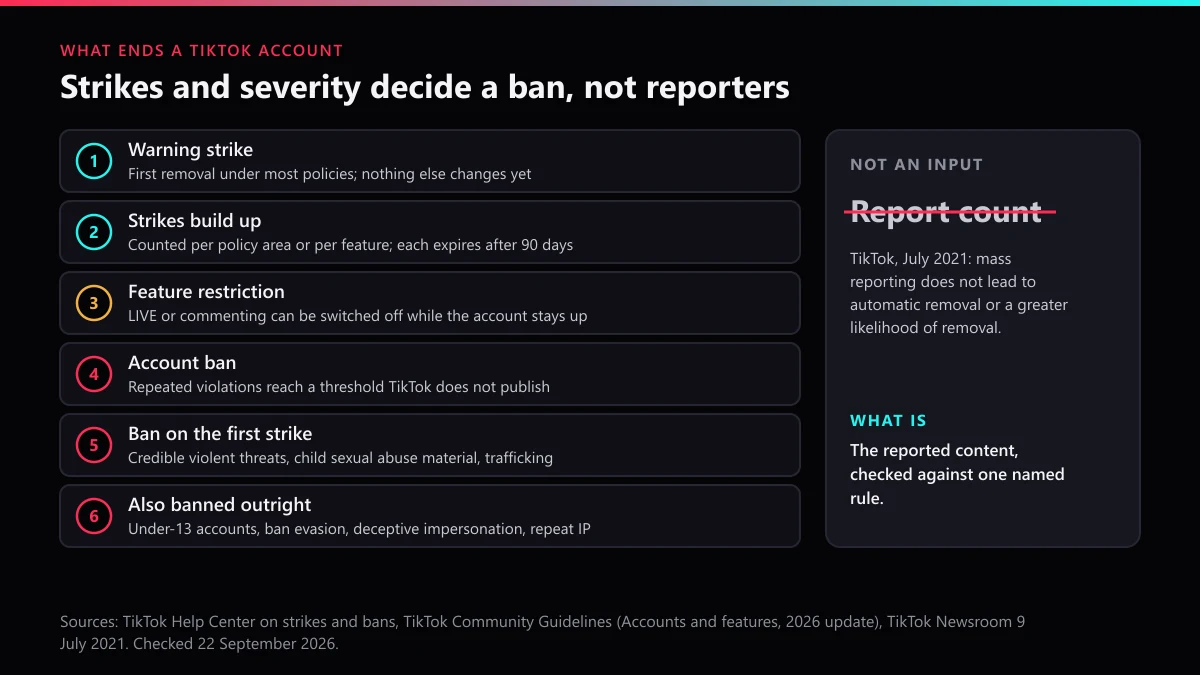
Most accounts reach a ban through strikes. The first removal usually carries a warning strike. After that, strikes are counted separately for each policy area and for each feature, so an account can lose commenting or LIVE while its videos stay up, and each strike expires after 90 days. TikTok warns an account holder who is on the verge of a ban, and deleting the offending videos does not wipe the strikes, which closes the obvious escape.
Some violations skip the ladder. A first strike ends the account for credible threats of violence, child sexual abuse material or grooming, adult sexual-abuse imagery and trafficking. TikTok also bans accounts it believes belong to children under 13, deceptive impersonation accounts, accounts opened to get around an earlier ban, and accounts with repeated intellectual-property violations; for copyright, its Help Center sets the limit at three strikes. Impersonation has its own evidence route, explained in reporting an impersonator, and the copyright path is laid out in the DMCA account route.
The Community Guidelines version that takes effect on 24 September 2026 tightens one point that matters here. Released on 25 August 2026, it says a ban can extend to "all of their accounts, including associated accounts", so a backup profile run by the same person can go down with the main one. It also adds optional policy training that can restore full access after some restrictions, which means a restriction today is not always a ban tomorrow.
Two things a ban never does. Getting an account banned does not hand you its username, since inactive and taken handles are freed by a separate process covered in claiming a TikTok username. A ban is also not deletion: only the owner can delete an account, as deleting your own account shows, while everyone else reports it and lets TikTok decide, which is the whole subject of deleting someone else's account. The profile-level violations worth a whole-account report are listed in what removes a whole profile.
How to report a TikTok video and get it deleted
Report the clip itself rather than only the profile, because a video report puts that exact post in front of the reviewer. Press and hold the video or tap the share arrow, choose Report, and pick the reason that describes what the clip shows, not how it made you feel. The reason you pick decides more than anything else, and the category choices are set out in choosing the right report reason; the single-video flow, including what happens to the clip afterwards, is on reporting one TikTok video.
How to report a TikTok account and get it deleted
An account report asks TikTok to weigh the whole profile, so it works when the profile's own content already proves the case:
- Open the profile, tap the share arrow or the three dots at the top, choose Report, then Report account.
- Pick the reason that matches the most serious thing on the profile, not the most irritating.
- Report the two or three clearest videos separately as well, each under its own reason, so the reviewer has specific content to confirm.
- Switch to TikTok's impersonation form when the account is posing as you or your brand, because that form asks for proof of identity.
- Look for the outcome under Report records in the Safety Center before you file the same report again.
How profile reports differ from video reports is compared in reporting an account or a video, and escalating a TikTok report covers what to do when the in-app route stalls.
Can you get someone banned on TikTok fast, or for no reason?
Fast, sometimes; for no reason, never. TikTok's own data shows 96.2% of report-led removals landing within two hours, and every one of those videos broke a rule, so speed comes from severity and clarity. A report naming a credible threat, with the video link attached, gives a reviewer less to work out than a complaint about a creator you dislike. Paying someone does not change the queue, which is why what a removal fee buys comes down to evidence and routing, and if something has to come down today, getting a TikTok taken down quickly separates what you can remove yourself from what only TikTok can.
For no reason is a different matter, because the attempt itself breaks the rules. TikTok's safety and civility policy prohibits "encouraging others to leave abusive comments or falsely report an account", and its terms for users in the EEA and UK bar reports and complaints "which are clearly unfounded". Article 23 of the Digital Services Act adds a formal consequence: after a warning, a platform suspends processing notices from anyone who frequently sends manifestly unfounded ones. A pile-on against a lawful account puts the reporters at risk and leaves the target where it was, and TikTok Ban Service turns those jobs down for the same reason.
Is there a Reddit trick for getting someone banned on TikTok?
No, and the search does not even surface one. When we ran how to get someone banned on TikTok reddit in September 2026, we got back no Reddit thread at all; what ranked instead were Quora questions and TikTok's own search pages, and their titles mixed up report counts with violation counts.
The ban you can apply yourself, quickly
Blocking is the one ban nobody at TikTok has to approve, and from a profile it is silent: TikTok's help page on blocking users says blocked people won't be notified. That is what most results for how to ban someone from TikTok, how to ban someone's TikTok account or how to ban someone on TikTok quickly are really describing. It closes your side of the app and leaves their account status untouched.
| What you do | Who can do it | What it stops | Are they told? | Counts toward a TikTok ban? |
|---|---|---|---|---|
| Block from their profile | Anyone | Their access to your profile, posts and messages | No | No |
| Mute their posts | Anyone | Their posts in your feed | No | No |
| Comment settings and filters | The creator | Who can comment, and which comments wait for approval | TikTok does not say | No |
| Mute in a LIVE | Host, or a moderator with permission | Their comments, for 5 seconds up to the whole LIVE | Yes | No |
| Block in a LIVE | Host, or a moderator with permission | This LIVE and your future LIVEs | Yes | No |
| Report | Anyone | Nothing, until review confirms a violation | Never who reported | Yes, when confirmed |
A block has edges worth knowing before you rely on it. The same help page says the person can still turn up in a multi-host LIVE, in other people's Duets and in group chats you share, and a block lasts only until you undo it. When safety is the aim rather than quiet, block first and report second.
How to ban someone from commenting on your TikTok
Block them, or narrow who can comment at all. The control sits under Settings and privacy, then Privacy, then Comments, where you can limit comments to followers or friends. Below it are the filters: keyword filters, a filter for unwanted comments, Creator Care Mode, and Filter all comments, which holds every comment until you approve it, although TikTok notes that option "isn't currently available to everyone". For a pile-on already underway, TikTok lets you delete or report up to 100 comments at once, and reporting comments and harassment explains what a comment ban then does to the other account.
How do you ban someone on TikTok LIVE as the host or a moderator?
Mute or block them from inside the stream, and set up moderators before you start so you are not doing it alone. TikTok's LIVE safety guide and Help Center describe the kit in this order:
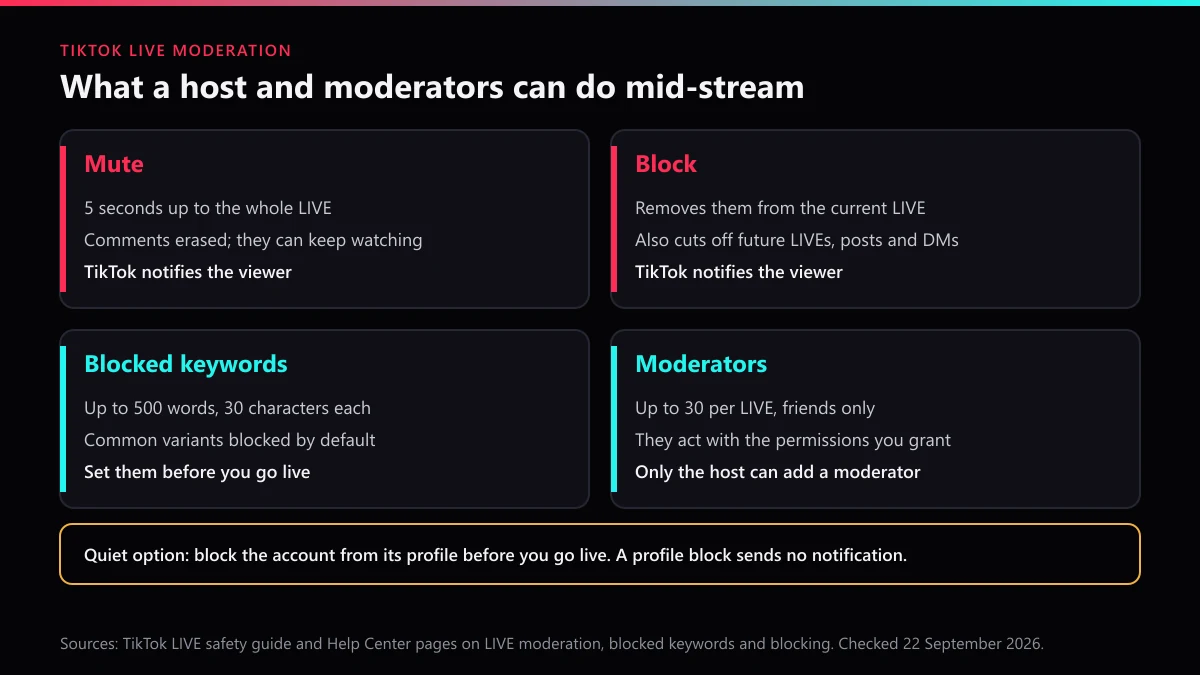
- Add moderators before you go live. They have to be your friends, TikTok allows up to 30 per LIVE, and only the host can add one.
- Grant the permissions you want them to use: with yours, a moderator can mute or block viewers, report and filter flagged comments, pin comments and edit your keyword filters.
- Load blocked keywords in advance, up to 500 entries of 30 characters each, with common variants blocked by default.
- When someone crosses the line, open their options inside the LIVE and choose Mute, for anything from 5 seconds to the rest of the stream, or Block, which removes them from the current LIVE and your future ones.
- Report them as well if the comments break a rule, since a mute ends with the stream and only a report can reach their account.
That is the whole of how to ban someone on TikTok LIVE as a moderator: a moderator holds exactly the powers the host hands over, and nobody outside the stream can do it for you, TikTok Ban Service included. Shop LIVE is the exception on numbers, since TikTok's seller documentation lets a shop host add up to 200 moderator accounts from the same country.
Can you ban someone on TikTok LIVE without them knowing?
Not from inside the stream. TikTok's help page on moderating a LIVE says a muted viewer "will be notified", and a blocked viewer is told as well. The quiet route is to block the account from its profile before you go live: a profile block sends no notification, and a blocked account cannot watch your LIVEs. Blocked keywords are the other low-key tool, because they catch the comment without you singling anyone out, though TikTok does not say whether the commenter can tell.
Getting someone banned on TikTok LIVE is a different job
Report the stream while it is running, because the evidence goes when the broadcast ends. TikTok's enforcement report says a violation "will end a LIVE session and may lead to further LIVE restrictions or an account ban", and the volume is large: 50,791,858 LIVE sessions were suspended between January and March 2026, and 4,171,677 were restored on appeal. LIVE carries its own strikes, so a host can lose streaming while the account survives. Taking down a LIVE, a Story or a hashtag is covered in the TikTok takedown notice guide.
What TikTok Ban Service checks before a report is filed
Three questions decide whether a case goes anywhere, and they come before any report. Which written rule does the content break, named in one sentence? Is the problem the profile as a whole, or a handful of videos? Does a legal route fit better than the in-app button, as it does for copyright, trademark and impersonation?
When we worked through TikTok's Help Center for this guide on 22 September 2026, we saw that the screen most guides still call Account status has moved. An account holder now checks strikes under Settings and privacy, then Support, then Safety Center, then Account check, or in TikTok Studio under More tools. That matters to anyone on the receiving end of a report, because a creator who can see a strike can appeal it, and an appeal that succeeds restores the video and removes the strike.
TikTok Ban Service files and escalates the report, and TikTok makes the final decision; no seller of reports can change that order. Reporters in the EU have one extra lever that almost nobody uses: under Article 20 of the Digital Services Act, they can complain free of charge, for at least six months, about the decision TikTok made on their report. If the content breaks a rule you can name, send us the link and we will tell you which route fits before anything is filed. If it does not, block the account and skip the report, because no volume of reports turns a lawful profile into a banned one.
FAQ
Does TikTok tell someone who reported them?
No. TikTok says it will not disclose your identity, and the notice sent to the creator never says who reported. The exception is intellectual property: on a copyright or trademark report, TikTok may give the uploader the rights owner's name, so those reports are not anonymous.
Does blocking someone's account on TikTok notify them?
Not when you block from their profile or your comments, since TikTok's help page says blocked people won't be notified, but a mute or block inside a LIVE is different because TikTok tells that viewer. Either way, the block only closes your side of the app and never touches their account status.
How many strikes before TikTok permanently bans an account?
TikTok publishes no general number. Strikes are counted per policy area or per feature, and the first removal is usually a warning strike. Each one expires after 90 days. Copyright is the exception with a stated limit: three copyright strikes end the account, according to TikTok's Help Center.
How long does TikTok take to act on a report?
No deadline is promised. TikTok's January to March 2026 data shows 96.2% of the videos it removed after a user report came down within two hours, and 0.2% took more than a day. If nothing has changed after a day, check Report records in the Safety Center before filing again.
Can you appeal when TikTok finds no violation in your report?
In the EU, yes: the Digital Services Act lets a reporter complain free of charge about the decision on their report for at least six months. Elsewhere, re-report under the rule that fits better, or report the specific videos, since repeating the same report adds nothing a reviewer can use.
How do you permanently ban someone on TikTok yourself?
Only from your own space. A block lasts until you undo it and keeps that person away from your profile, posts, messages and LIVEs. A permanent ban from TikTok itself takes a severe violation, repeated strikes, ban evasion or an under-13 account, and only TikTok applies it.