23 September 2026 · TikTok Ban Service · 12 min read
How to report a fake account on TikTok when the copy is of you, your child or your brand
To report a fake account on TikTok, open its profile, tap Share (or More options on the web), then Report, Report account and Pretending to Be Someone, and choose Me or Celebrity. If the copy is of you, back it up with TikTok's impersonation form and a photo ID. A friend cannot file for you, and a brand uses the trademark form.
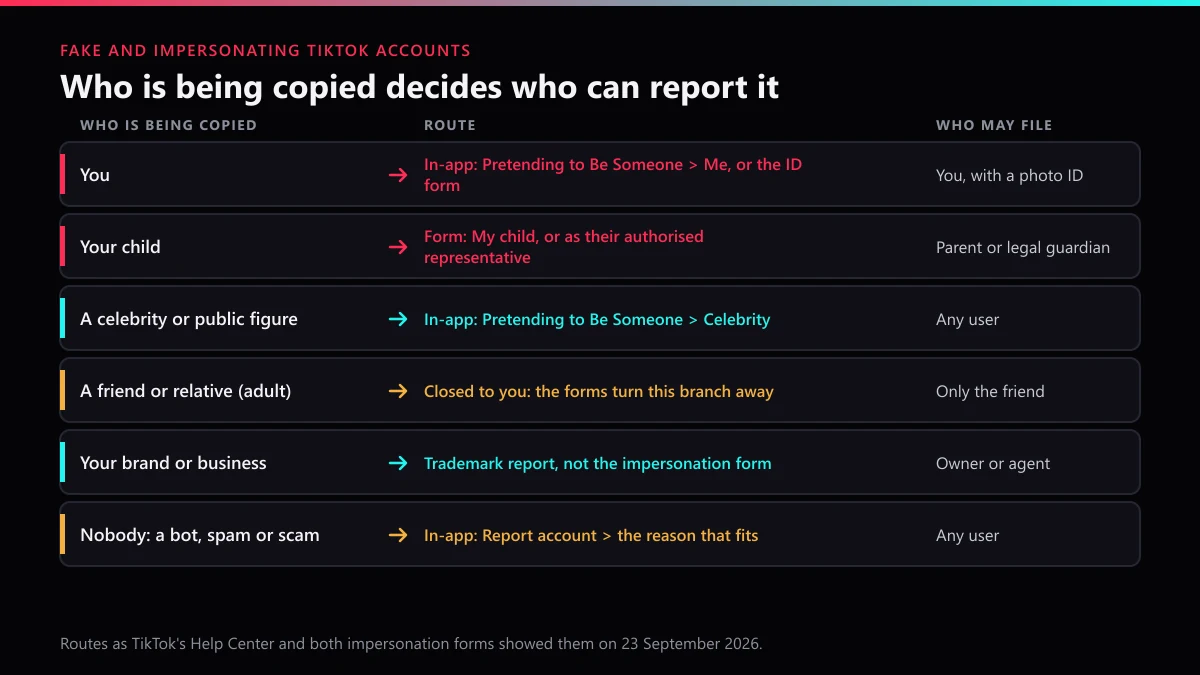
Who, exactly, is the fake account pretending to be? Everything else follows from that. TikTok runs a report button that anyone can press and a pair of identity forms that only the person copied may use, and the two lead to very different reviews. Pick the wrong one and the answer is usually "no violation", which tells you nothing about why.
There is also a split between a fake account and an impersonation account. A spam bot with a stock photo is fake, but it copies nobody, so it goes through the ordinary account report. An account wearing your name, face and bio is impersonation, and TikTok treats it as an identity case.
Who is allowed to report someone on TikTok for impersonation?
The person being copied, or someone legally allowed to act for them, and nobody else. Both of TikTok's impersonation forms say it outright. Choose "Someone else (e.g. a friend of mine)" on the US form and every field disappears behind one line: "We can only act on reports submitted by the person being impersonated or their authorized representative (e.g. parent, legal guardian, legal representation)." Outside the US, the matching form gives that answer in almost the same words.
We ran into this on 23 September 2026 while mapping both forms branch by branch for this page. The branch a worried sibling or best friend would naturally pick is the one TikTok closes. By contrast, the in-app button is more open, but only for public figures: its Celebrity option lets any user search for the real account and flag the copy. For a private person, the report that counts is theirs.
| Who is being copied | Route that fits | Who may file | What TikTok asks for |
|---|---|---|---|
| You | In-app Pretending to Be Someone, then Me; the impersonation form if that fails | You | A photo of you holding ID, on the form |
| Your child | Form: My child (outside the US) or authorised representative (US) | Parent or legal guardian | Both usernames, plus screenshots |
| A celebrity or public figure | In-app Pretending to Be Someone, then Celebrity | Any user | The real account, found by search |
| An adult friend or relative | None open to you | Only them | Send them this page |
| Your brand, shop or company | Trademark or intellectual-property report | The owner or an agent | Trademark details |
| Nobody in particular | Ordinary Report account, with the reason that fits | Any user | Nothing beyond the report |
That last row covers most fake accounts on the platform, and most never need you at all. A broader menu of account reasons is covered in reporting a TikTok account or a video, and a single fake post, rather than the whole profile, goes through reporting one TikTok video.
How do you report a fake TikTok account on your phone or iPhone?
On an iPhone and on an Android phone the steps match, because TikTok uses one reporting flow in its app. TikTok's impersonation help article gives these steps, and they matched the app when we checked:
- Open the fake profile and tap the Share button at the top.
- Tap Report, then Report account.
- Choose Pretending to Be Someone.
- Pick Me if the account copies you. Pick Celebrity if it copies a public figure, then search for the real person's username and select their account.
- Tap Submit.
Reporting from the profile rather than from one video matters here. Impersonation is judged on the account as a whole (name, photo, bio, what it posts), and a report on a single clip only asks whether that clip breaks a rule. If the copy is also sending your followers messages, report those too, since a scam pitch in someone's inbox is often the strongest evidence you will get.
How to report a fake TikTok account online from a computer
On tiktok.com the path is almost the same. Open the profile, click the More options button (the three dots), then Report, Report account and Pretending to Be Someone, and choose Me or Celebrity. The web route suits anyone who keeps screenshots and links on a computer, since the impersonation forms below also run in a browser.
When should you use TikTok's impersonation form instead of the report button?
Use it when the account copies you or someone you legally represent, and especially when an in-app report has already bounced. A button report sends a flag with nothing attached. A form sends proof of who you are, and that is the one thing a reviewer cannot work out by looking at two similar profiles. TikTok runs two versions: the US impersonation form and a report-a-problem form for everywhere else.
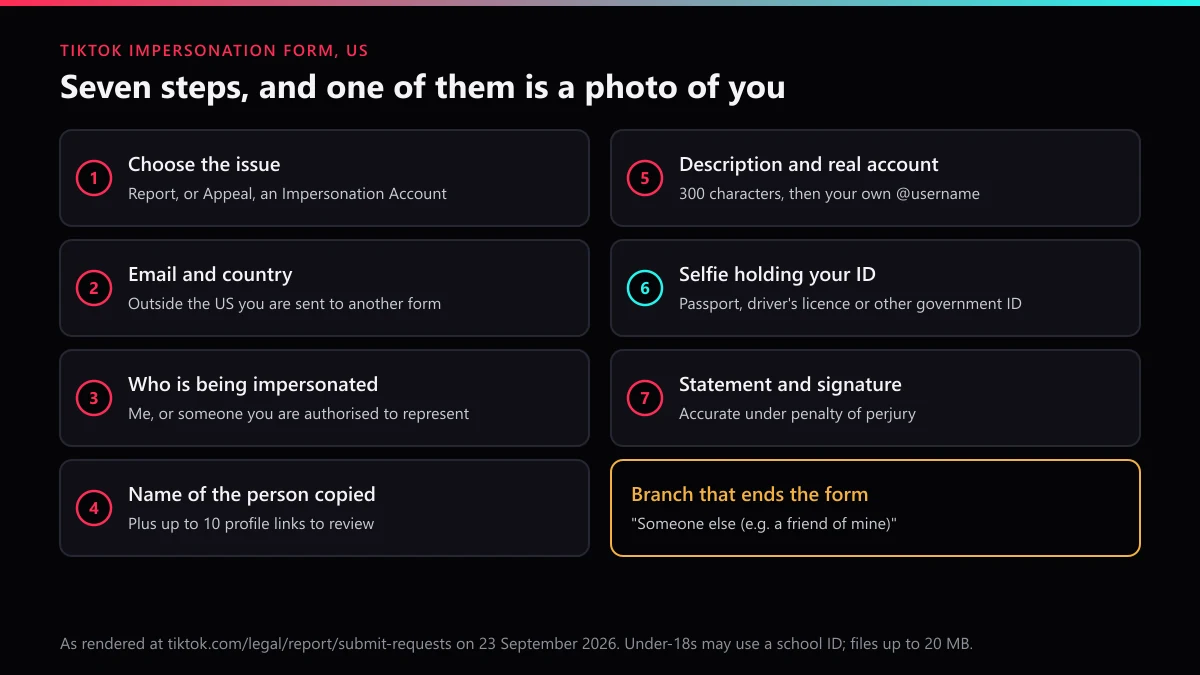
On 23 September 2026 the US form ran in seven steps once "Report an Impersonation Account on TikTok" was chosen:
- Your email address, then your country; a link sends anyone outside the US to the other form.
- The app where the copying happens, TikTok or Lemon8.
- Who is being impersonated: Me, Someone that I'm authorized to represent, Someone else, or Brand or organization.
- The full name of the person copied and up to 10 profile links for review.
- An optional description of up to 300 characters, plus the username of the real account.
- A clear photo of you holding a passport, driver's licence or other government ID, with face and ID photo both visible; under-18s may use a school ID. Up to 10 files, each no larger than 20 MB, as PDF, PNG or JPEG.
- A statement "under penalty of perjury" that you are the person or their legal representative, then your name as an electronic signature.
Outside the US, choose Report a potential violation, then Account violation, then Impersonation. Its branches are Myself, A celebrity or public figure, My child, Someone I'm duly authorized to represent, A business or organization and Someone else. The Myself and My child branches ask for the original and the impersonating usernames, a contact email, the link, details and up to 10 screenshots, with a declaration instead of the perjury line. Its celebrity branch sends you back to the in-app report and promises that "When TikTok verifies your report and finds it to be true, the impersonator's account will be subsequently removed."
Can you report a fake TikTok account anonymously?
From the button, largely yes; from the form, no. An in-app report is sent from your own logged-in account and asks for no name, email or document, and TikTok's help pages describe no step that tells the reported account who filed. An impersonation form works the other way round. It is built on your identity: your email, your real account, your legal name as a signature and a photo of your face beside your ID. TikTok needs all of that to decide which profile is the real one.
So the honest answer depends on who is asking. A bystander flagging a celebrity copy or a scam bot stays out of view. Whoever is being copied cannot stay anonymous to TikTok, and does not need to be, because the impersonator is the one who has to explain themselves. Why reporting still works this way, and why dozens of reports from strangers do not outweigh one verified form, is set out in choosing the right report reason over a mass report.
Why does a TikTok fake account report come back as no violation?
Most rejections trace back to the route, not the reviewer. When people end up searching for a TikTok fake account report Reddit thread, it is usually after one of these:
- The account is labelled. TikTok allows fan, commentary and parody accounts. Its privacy blog says that where someone pretends to be another person, "we expect them to make it clear in the display name if it's a fan or parody account". A copy with "fan" in the name will usually survive.
- The wrong person filed. A friend reporting in-app has only Me and Celebrity to choose from, and neither fits a private person they are not.
- Celebrity was used for a private person. That option expects a public account to match against; for anyone else the reviewer has nothing to compare.
- Only the photos were taken. An account using your pictures under another name is closer to a copyright or privacy problem, and the copyright route is laid out in reporting stolen content on TikTok.
- The real account looks weaker than the copy. A new, empty profile next to an older copy gives a reviewer little to go on, and an ID form solves that.
Piling on does not fix any of these. A friend group sending the same flag adds volume, not evidence, and a look inside a mass report tool shows why the numbers do not move a review. Report counts matter less than people think in general, as what actually gets a TikTok account deleted explains.
How do you report a fake TikTok LIVE stream?
Report the stream while it is running, then report the account behind it. Fake LIVEs tend to borrow a creator's name and photo to run a giveaway or ask for gifts, and the stream is where the harm happens in real time. TikTok's Help Center gives the LIVE steps as: go to the LIVE, tap Share, tap Report and select a reason, choose a subtopic if asked, then Submit. Once the stream ends, file the profile report or the impersonation form described above, because a LIVE report is judged on that session alone.
If you are the creator being copied, tell your audience where your real account is, and pin that notice. TikTok itself gives the same advice in its guide to account impersonation, published on 30 September 2025. A copy that is harassing you rather than selling to your followers fits better under reporting harassment on TikTok.
How do you report a fake TikTok page pretending to be a business?
Through intellectual property, not impersonation. On the US form, the Brand or organization branch says that "brands or organizations can click here to submit a trademark infringement report" and hands the case to TikTok's Intellectual Property team. Outside the US the business branch opens with a question about whether the account infringed intellectual property rights. Either way you will need the trademark owner's details, and a field-by-field version is in filing a TikTok trademark form. A fake shop selling counterfeits under your name also belongs in reporting counterfeit sellers and Shop violations.
Money is usually the point of these pages. People reported losing $3.5 billion to impostor scams in 2025, and nearly one fraud report in three concerned an impostor, according to FTC data released on 15 June 2026. Business impersonators accounted for nearly $1 billion of that, out of about $16 billion in total reported fraud losses, the highest on record. If customers have already paid a fake page, report it to the FTC or your local fraud body as well as to TikTok.
How many fake TikTok accounts does TikTok remove on its own?
Tens of millions every quarter, before anyone reports them. TikTok's Community Guidelines Enforcement Report puts fake accounts removed at 86,288,705 for January to March 2026, down from 147,716,518 in the last quarter of 2025. In 2024 the figure never dropped below 171 million a quarter, peaking at 208,681,876 between April and June. Those are mostly automated sign-ups: bots, spam farms and accounts sold for fake engagement.
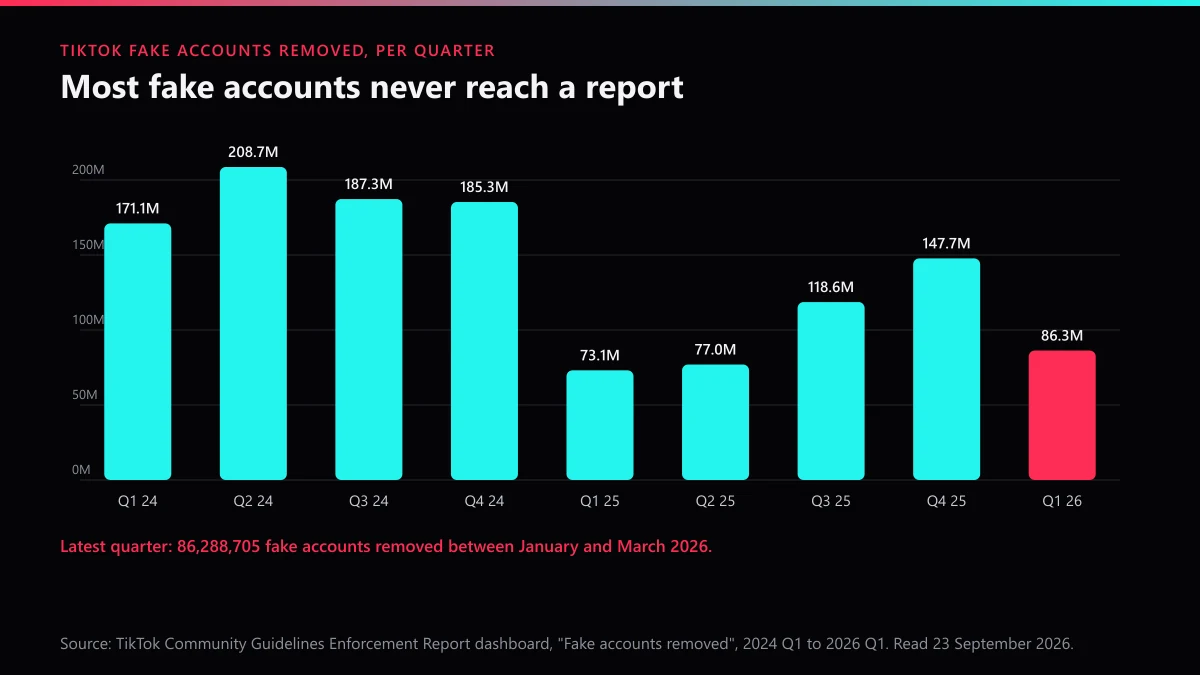
That machinery is good at volume and poor at identity. A spam bot looks like other spam bots. A copy of one particular person looks like an ordinary account until someone who knows the real one says otherwise, which is why impersonation still runs on reports and ID rather than detection alone.
What happens after TikTok removes the impersonation account?
The copy disappears, and the person behind it may try again. Deleting an account is something only its owner can do, so removal is TikTok's decision, a point deleting someone else's TikTok account covers in full. Keep the case notes from the first report; the same proof will be needed if a second copy appears. From 24 September 2026, TikTok's updated Community Guidelines say a ban can extend to "all of their accounts, including associated accounts".
Watch for the reverse move, too, because some impersonators report the real account first, hoping a reviewer removes the wrong profile. TikTok's US form has a separate "Appeal an Impersonation Account on TikTok" option for accounts banned by mistake. If you have given up on the platform and want your own account gone, that is a different, permanent step, explained in deleting a TikTok account.
Is a TikTok impersonation removal service worth paying for?
Only for the legwork. Every TikTok route on this page is free, and no service has a private line to TikTok's reviewers. What a service can do is pick the right route, collect proof the reviewer will accept, file it once and follow it through. It cannot promise a removal or a date, and it should refuse any job where the target is a labelled fan page or a critic. What a fee should and should not buy is broken down in paying for TikTok account removal, and why report bots do not remove accounts covers the offers that promise more.
At TikTok Ban Service we start with the question a reviewer will ask: is this really a copy? Then we match the case to the forms in the order above, keep the timeline in a written takedown notice in case the copy returns, and say plainly when nothing can be done today, as how quickly a TikTok can come down explains. To start, send us the profile links and who is being copied.
FAQ
Is it free to report a fake TikTok account?
Yes. The in-app report, the web report and both impersonation forms cost nothing, and TikTok sells no faster lane. A paid service can prepare the evidence and pick the route, but TikTok still makes the decision.
Can you report a fake TikTok account anonymously?
Partly. An in-app report is sent from your own logged-in account and asks for nothing about you, but the impersonation form is the opposite: it asks for your email, your real account and a photo of you holding ID. You are anonymous to the impersonator's view of the flow, not to TikTok.
Can you report a fake TikTok account online without the app?
Yes. On tiktok.com, open the profile, click More options, then Report, Report account and Pretending to Be Someone. The impersonation forms also run in any browser, and the US form asks for an email address before anything else.
How long does TikTok take to remove an impersonation account?
TikTok publishes no time for impersonation reviews. Its enforcement data shows fast action on content reports generally, but an ID-based form is read by a person, so watch the email you gave rather than filing the same report again.
Are fan and parody accounts allowed on TikTok?
Yes, if the display name says so. TikTok's impersonation form says fan, commentary and parody accounts are allowed where the name makes clear the account is not affiliated with the person, so a copy that labels itself that way will usually survive a report. An unlabelled copy gets no such protection.
What if the fake account reports your real TikTok account for impersonation?
Use the Appeal an Impersonation Account on TikTok option on the same US form, which exists for accounts banned for impersonation by mistake, and include the ID proof and your original username. Outside the US, appeal from the ban notice in the app.
Why do people ask Reddit about TikTok fake account reports?
Usually because an in-app report came back with no violation found. The common causes are filing for a friend, picking Celebrity for a private person, or reporting a labelled fan account; filing the ID form yourself fixes the first two.