28 September 2026 · TikTok Ban Service · 11 min read
TikTok account password recovery: which reset still works for you
TikTok account password recovery starts on the login screen: tap Use phone / email / username, then Forgot password?, and TikTok sends a code to the phone number or email on the account. If you joined with Google, Apple or Facebook, reset it there. With neither contact left, use Recover account or the Need more help? form.
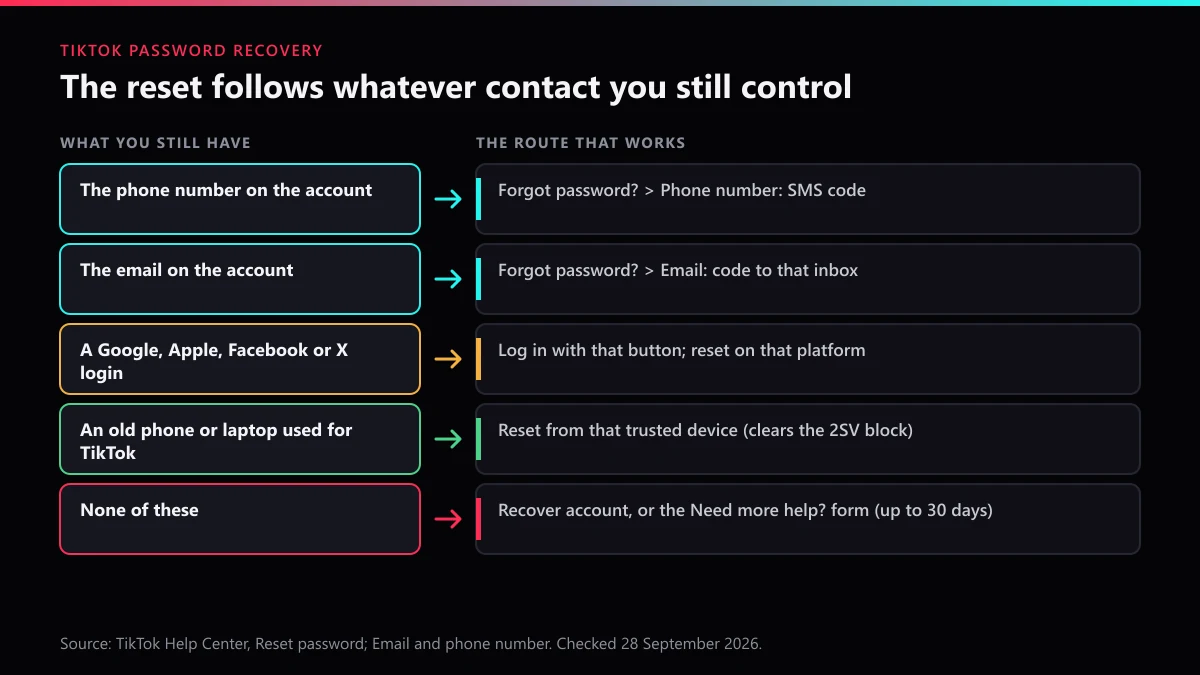
A password reset on TikTok is not really about the password. It is about the contact details stored on the account, because the reset code goes to them and nowhere else. If the phone number on file still rings and the inbox still opens, recovery takes a couple of minutes. If one of them is gone, you have one route left. If both are gone, you are asking a person at TikTok to believe you, and TikTok's own help page says that form "may take up to 30 days."
So before tapping anything, work out what you still control.
Which reset does your TikTok account still accept?
The one that matches whatever is still in your hands. Five situations cover almost every locked-out account, and each points at a different screen. Find your row before you start, because the wrong route wastes attempts and, on a device TikTok does not recognise, can end in an error that no code will fix.
| What you still have | Route to use | Where the code or answer goes |
|---|---|---|
| The phone number on the account | Forgot password? then Phone number | An SMS code to that number |
| The email on the account | Forgot password? then Email | A code or link to that inbox |
| A Google, Apple, Facebook or X login | Log in with that button; reset on that platform | That platform's own recovery |
| A phone or tablet you used for TikTok before | Reset from that trusted device | The usual code, without the unrecognised-device block |
| None of the above | Recover account, or the Need more help? form | A review by TikTok's support team |
The third row trips people up more than any other. TikTok states that if you "joined TikTok using another social media account," the password has to be reset on that platform. An account opened with Sign in with Apple has no TikTok password to forget, so Forgot password? will go nowhere useful for it.
How does TikTok account recovery work when you forgot the password?
Through the Forgot password? link on the login screen, which sends a code to the phone number or email saved on the account. The steps below are the ones on TikTok's Reset password help article, checked on 28 September 2026.
- Open the TikTok app and tap Sign up, then Log in at the bottom of the page.
- Select Use phone / email / username, then choose Email / Username.
- Type your username or email and tap Forgot password?
- Pick Phone number or Email for the reset and enter the code TikTok sends.
- Set a new password. Every other device signed in to the account is logged out at that moment.
That last point matters if you think someone else got in. TikTok says anyone logged in elsewhere will "no longer have access" once the password changes. On a computer the path is the same after logging out: Log in, Use phone/email/username, Forgot password?
If the app still has you signed in but you want the password changed, go to Settings and privacy, Report a problem, Account and profile, Login, then Forgot password. It is the least-known path and the fastest one.
Why does the reset stop with an "unrecognised device" error?
Because 2-step verification is switched on and you are resetting from a phone TikTok has never seen you log in from. The block is deliberate: TikTok says it stops a reset "even if they have access to your email or phone number," so a stolen SIM alone cannot take the account.
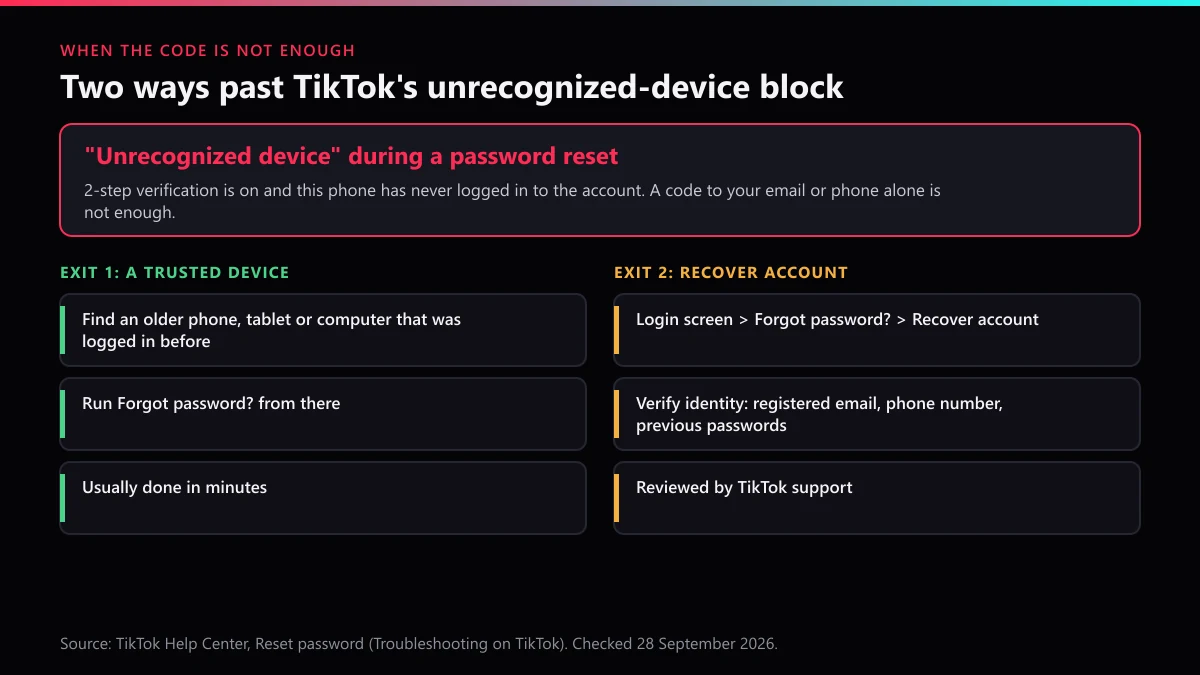
There are two ways out. The quick one is to pick up an older phone, tablet or laptop that was logged in before and reset from there, even if the account was signed out of it long ago. The slow one is Forgot password? then Recover account, where TikTok asks you to verify your identity and "may" ask for the registered email, the phone number or previous passwords. Support reviews the answers by hand.
Old passwords count here. If a browser or password manager ever saved one, find it before you start the form rather than after.
What if you forgot which email is on your TikTok account?
Then use any other way in first, because TikTok only shows the account's email to someone already logged in: Settings and privacy, Account, User Information, Email. If the app is still signed in on any device, that screen answers the question in seconds.
When nothing is signed in, narrow it down yourself. Search each inbox you have ever used for messages from TikTok; old signup and code emails are often still sitting there. Try logging in with the phone number instead, since you do not need to know the email to use a phone reset. And check whether the account was opened through Google or Apple, because in that case the "email" is simply your Google or Apple account, and it is Google or Apple that resets it.
Guessing is slower than it looks. Each email can belong to only one TikTok account, so an address that is not on yours either fails or belongs to some other account entirely, and a code sent there helps nobody. Three careful checks beat twenty guesses.
Can you recover a TikTok account without the email?
Yes, if the phone number on the account still works: choose Phone number on the reset screen and the email never comes into it. Without the phone as well, the route is TikTok's Need more help? form, which its email and phone number help page describes as resetting your "authentication method" once your identity is verified.
You cannot swap a dead email for a new one yourself. TikTok sends a code to both addresses when you change it, and says "both the old and the new email address associated with the account must be active and verified." That rule is why a deleted school or work mailbox strands so many accounts: the reset needs the old inbox, and so does the change.
The form asks for whatever proves the account is yours. Give it everything that matches the account as TikTok knows it: the exact username, the phone numbers and emails you may have used, roughly when you created it, the device model, and the last date you were logged in. Write the answers once, before opening the form, so the story is the same if TikTok writes back with more questions.
If the phone number is the lost piece, move quickly. Carriers recycle numbers, and a number TikTok still ties to your account can end up in a stranger's pocket.
What makes a TikTok recovery request slower, or impossible?
Time, mostly. Three clocks keep running while you wait, and each changes what TikTok can give back.
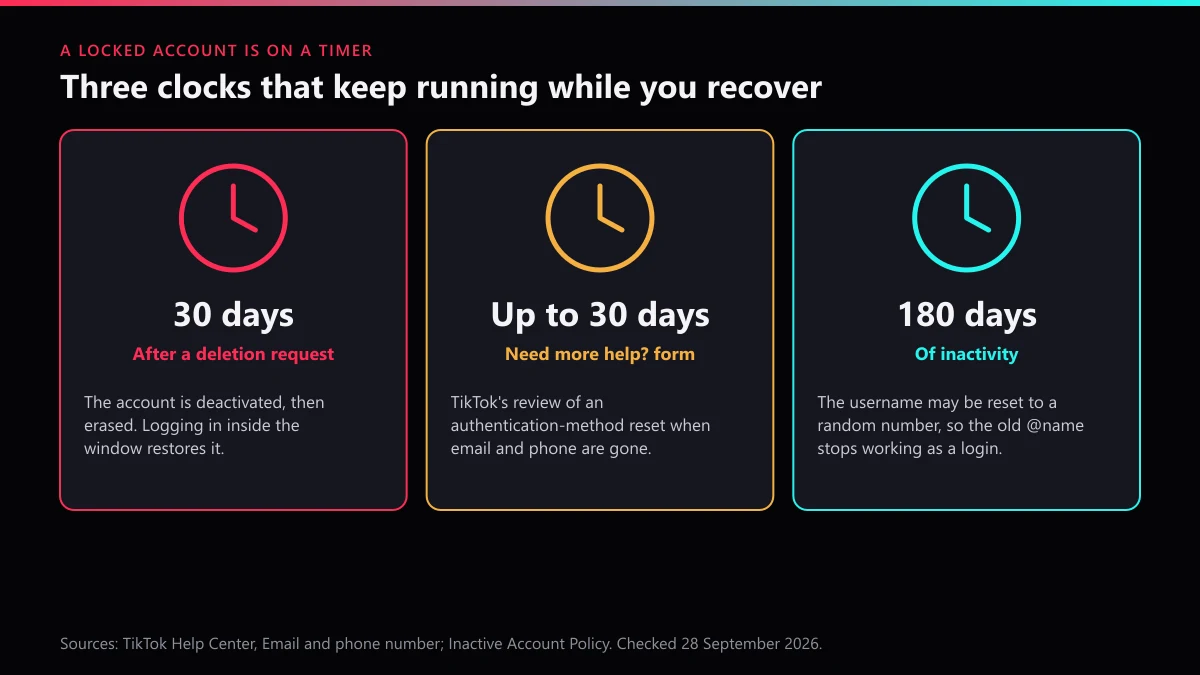
- 30 days after a deletion request. A deleted account is deactivated for 30 days and then erased. If you or someone with access pressed delete, logging back in during that window restores it. Our guide to deleting your own TikTok account walks through that window.
- Up to 30 days for the form. The Need more help? review can take that long. Submitting it twice does not move you up the queue.
- 180 days of inactivity. TikTok's Inactive Account Policy says an account unused for 180 days or more may have its username reset to a random number. After that, logging in by the old @name finds nothing, and the phone or email becomes the only key. Here is how username reclaiming works on TikTok if someone has since taken the name.
When we checked these help pages on 28 September 2026, TikTok served them in Turkish by default, following the browser's region, and only switched to English after we added lang=en to the address. The steps were the same in both, but the menu names were translated, so if your app is not in English, match the order of the steps rather than the words.
Is someone else using your account, or a copy of it?
Look for the signs TikTok lists on its hacked account page: a changed password, phone number or username, videos deleted or posted without you, and messages you never wrote. Any of those means you are recovering a taken account, not one you forgot the key to.
Takeovers are common enough that the UK counts them. Action Fraud received 35,434 reports of social media and email hacking in 2024, up from 22,530 in 2023, and named theft of the account itself as one of the three usual motives.
While the recovery request sits in the queue, the damage usually happens somewhere else: a second profile with your photo and name, messaging your followers. That profile can be reported now, without waiting to get your own login back. You can report a fake account that copies you, report the reposted videos as stolen content, and report harassment if the copy is being used to go after people you know. For the difference between a single item and the whole profile, see our notes on reporting an account or a single video and how to flag an individual video on its own.
Where a copied profile uses your name and face, the report category matters. Our breakdown of which Community Guidelines violation to pick covers it, and submitting a report step by step shows the in-app screens. A copyright or legal claim goes through a formal takedown notice instead. If the copy keeps posting, how fast TikTok removes content sets realistic expectations, and an account takedown handled through official channels is what we do when the evidence is there.
Should you pay someone who says they can recover it?
No. Nobody outside TikTok can reset a TikTok password, and the people who message locked-out users offering to do it are after a fee, your remaining logins, or both. TikTok never asks for your password or a login code, and neither should anyone claiming to help.
The same sellers tend to run a second menu: bans for hire. The pitch is usually a mass report bot or its cousins, automated account-report bots and spam-report bots. We have written up what a mass report tool really does, why how many reports it takes is the wrong question, and the risks of paying someone for an account removal. The short version is that TikTok judges the content, not the headcount, which is also the point of our piece on mass reporting versus impersonation reports.
If revenge is on the table because someone took your account, read what actually gets an account banned and the limits on deleting an account that is not yours before doing anything. A hijacker running a TikTok Shop from your old profile is a different case, and getting a Shop removed covers it.
Once you are back in, what keeps it from happening again?
Two contact methods and one extra lock. TikTok recommends keeping both a phone number and an email on the account, so losing one never strands you, and switching on 2-step verification, the same advice Action Fraud gives for every account. A passkey, which TikTok now supports, removes the password from the equation on that device.
Then open Settings and privacy, Security and permissions, Manage devices, and remove anything you do not recognise. Write down where the recovery email lives, and update it the day that mailbox is about to close, not after.
If the problem was never your login but an account that should not exist, send us the details. Our TikTok Ban Service home page explains what we take on, and the full list of TikTok reporting guides covers the rest.
FAQ
How long does TikTok take to answer a Need more help? request?
TikTok's email and phone number help page says resetting your authentication method through that form may take up to 30 days. It depends on how well your answers match the account, so give the exact username, every email and number you may have used, and the device you logged in on.
Can I recover my TikTok account if my old phone number was given to someone else?
Not by SMS, because the code now goes to the number's new owner. If the email on the account still works, reset by email. If it does not, use the Need more help? form, since changing the number yourself needs codes on both the old and the new number.
Why can't I reset my TikTok password from a new phone?
If 2-step verification is on, TikTok blocks a reset from a device it has not seen you log in from and shows an unrecognised device error. Reset from an older phone, tablet or computer you used before, or tap Recover account and verify your identity instead.
I signed up for TikTok with Apple or Google. How do I recover the password?
There is no separate TikTok password in that case. Log in with the Apple or Google button you used at signup, and if you have lost that login, recover it through Apple or Google; TikTok says the password has to be reset from the platform you joined with.
Does changing my TikTok password log out other devices?
Yes. TikTok says that after the password is updated you are logged out on all other devices, so anyone else signed in to the account loses access and would need the new password.
Can I recover a TikTok account I deleted?
Within 30 days, yes: a deleted account is only deactivated for that period, and logging back in restores it. After 30 days it is erased, and the email or phone number can then be used for a new account.
Will I lose my username if I cannot log in for months?
Possibly. Under TikTok's Inactive Account Policy, an account not used for 180 days or more may have its username reset to a random number, so log in with the phone or email rather than the old @name once you get access back.