30 September 2026 · TikTok Ban Service · 10 min read
TikTok account recovery without phone number: start from where the number went
TikTok account recovery without phone number access runs through the email on the account, a device you used before, or the Recover your account search, which takes your username. With neither phone nor email left, tap Can't access these? and ask two friends to verify you, or send the Need more help? form.
Most people who search this still have a phone. What they no longer have is the number: a contract ran out, a prepaid SIM lapsed on a trip, a work line went back to the employer. That number does not vanish when you let it go. In the United States about 35 million numbers are disconnected every year, and the standard practice is to hand them to new subscribers, according to Princeton researchers Kevin Lee and Arvind Narayanan.
So before you pick a recovery route, work out where your old number went. The answer changes which screen to open.
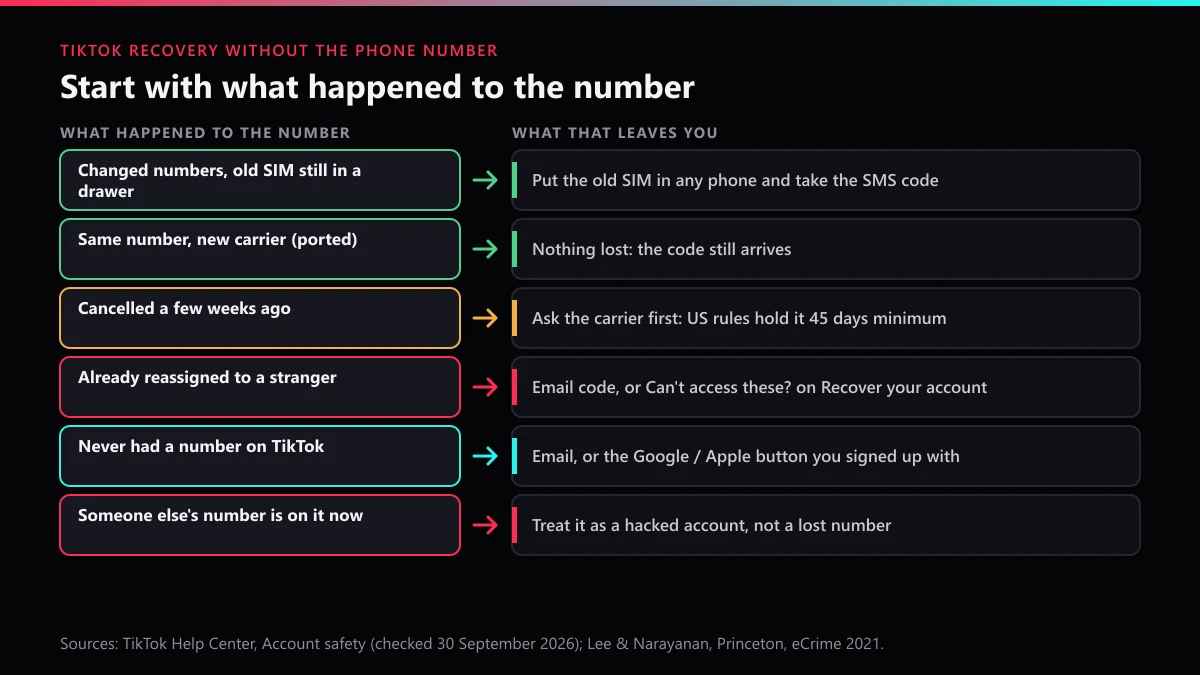
Where did the number go, and which route does that leave?
Six outcomes cover nearly every case, and only two of them actually cut you off from the SMS code. Find your row first.
| What happened to the number | What to do first | Does an SMS code still reach you? |
|---|---|---|
| You switched numbers but kept the old SIM | Put the old SIM in any phone, take the code, then change the number in Account Information | Yes, on the old SIM |
| Same number, new carrier | Nothing to recover; request the code as usual | Yes |
| Line cancelled in the last few weeks | Call the carrier and ask whether it can be reactivated before it is reassigned | Only if the carrier restores it |
| Number now belongs to someone else | Use the email on the account, or Can't access these? on Recover your account | No, it reaches a stranger |
| The account never had a number | Log in by email, or with the Google or Apple button you joined with | Not relevant |
| Someone else's number was put on it | Treat it as a takeover, not a lost number | No |
The third row is worth a phone call before anything else. US carriers must hold a disconnected number for a minimum "aging period" of 45 days before giving it to someone new, a rule the Princeton team says Verizon now spells out on its support pages after reading their findings. Whether your carrier will switch it back on inside that window is its own policy, so ask. Outside the US the rules differ by country; do not assume a grace period exists.
The last row is a different problem. If a number you never owned is sitting on the account, someone changed it, and our walkthrough for a TikTok account someone else took over starts from exactly that change.
Can you recover a TikTok account with just the username?
Only partly. The username tells TikTok which account you mean, but it cannot receive a code, so on its own it never proves the account is yours. TikTok account recovery with username information works in two places, and they do different jobs.
The first is the login screen. Under Use phone / email / username, the Email / Username tab accepts the username and your password. On a phone TikTok already remembers, that may be all it asks. On anything new, TikTok's Account safety page says a login from an unrecognised device needs your password plus a one-time code "sent via SMS or email." No number means the email has to catch that code.
The second is Recover your account, which is built for people who cannot get a code at all. This is how to recover a TikTok account without the number, following the Help Center steps as they stood on 30 September 2026:
- Open the TikTok app and tap the Help button at the top of the screen.
- Choose Recover your account.
- Type the username exactly, or the email linked to the account, and tap Search. If the old number is all you remember, Search by phone number sits on the same screen.
- Look at the contact options the account page offers. If one of them still reaches you, use it and stop there.
- If none do, tap Can't access these? at the bottom.
Username but no email either?
Then the username is your search key and everything after it depends on friends or on a TikTok reviewer. That is the whole of TikTok account recovery with username without email access: the search, then one of the two options behind Can't access these? Type the @name, not the display name, because display names can be copied by anyone. And if the account sat untouched for months, the @name may have been swapped for a random number under TikTok's inactivity rules, which is a separate fight covered in our notes on getting a TikTok username back from someone else.
What happens after you tap Can't access these?
You get two ways forward: ask friends to vouch for you, or ask TikTok staff to check your identity. This is the real answer to TikTok account recovery without phone number and email, because both routes skip the code entirely.
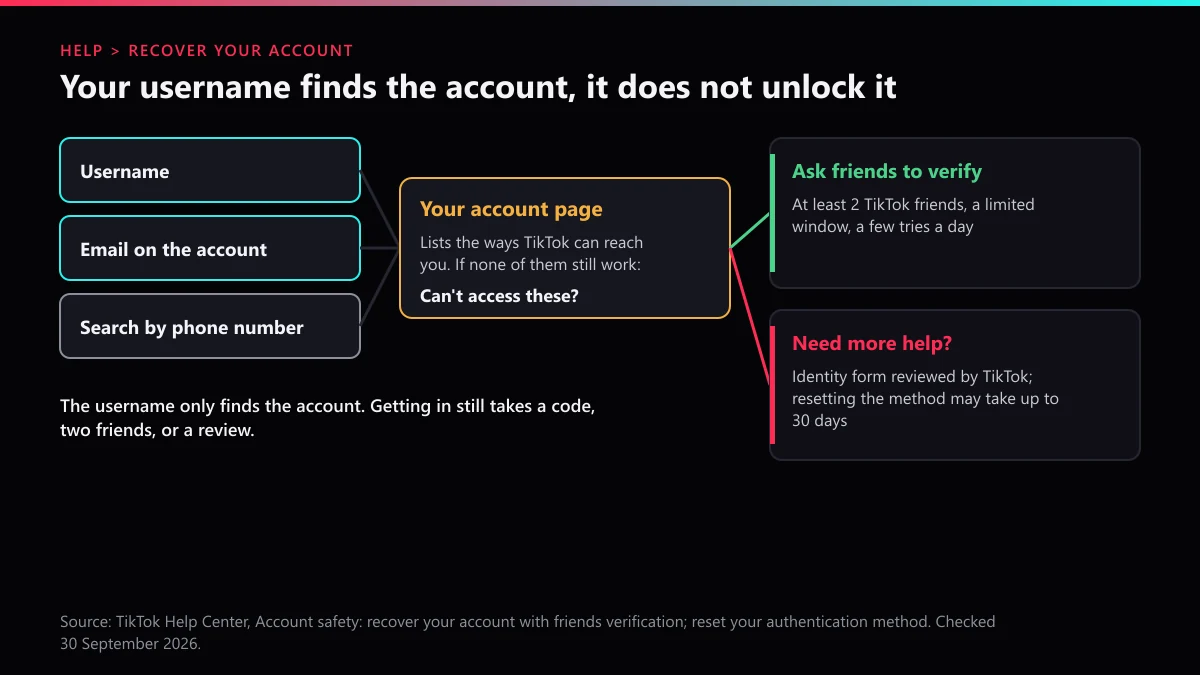
Ask friends to verify. TikTok needs at least 2 friends you are connected with on the app. They get the request as a notification inside their Security & permissions settings, they have a limited time to answer, and you can only send a limited number of requests each day. If they confirm you, TikTok logs you in automatically. The notification is easy to miss, so message those friends on another app before you tap Start; TikTok even offers a Share button with prewritten instructions for that.
Need more help? This is the identity form, reviewed by a person. Its outcome is a reset of your authentication method, and TikTok says that can take up to 30 days. If you have to recover a TikTok account without email or phone and you have no two friends to ask, this is the route left.
Pick one route and see it through. Friends verification is fast when it works; the form is slow but does not depend on anyone else remembering to tap a notification.
Why does a lost number make recovery more urgent?
Because the number lives on with a new owner, and that person receives whatever is still being sent to it. The Princeton study sampled 259 numbers on offer to new customers at T-Mobile and Verizon and found 215 of them were recycled and open to at least one of the attacks it tested, including taking over accounts through password recovery.
Then the researchers held 200 recycled numbers for a week. Nineteen of them were still getting security-sensitive calls and texts meant for the previous owner, authentication passcodes among them. Put your own TikTok in that picture: a code you request by accident, or one a hacker triggers, lands on a stranger's phone.
TikTok's own defences help here. A new device needs the password as well as the code, and with 2-step verification on, the code alone gets nobody in. But the rule for you is simple. If any phone, tablet or browser is still logged in to your TikTok, open Account Information today and replace the number, before you need it.
What if the part you lost is your Gmail, not your number?
Then it matters how the Gmail is attached, because there are two very different setups. TikTok account recovery without email access is easy while the phone still works; it is the pairing of a dead number and a lost Gmail that locks people out.
Gmail was only the address on file. You signed up with a phone or with the email typed in, and TikTok sends codes to that inbox. Recover the Google account first, then reset TikTok by email. Google's account recovery tips ask you to use a computer or phone where you frequently sign in, the same browser, and a place where you usually sign in, and to answer every question rather than skip any.
You tapped Continue with Google when you joined. Then there is no TikTok password behind the account, and Google is the login. TikTok account recovery without Gmail in this setup is really Google account recovery: get the Google account back, then press the same Google button on TikTok. One detail helps. TikTok says a passkey-enabled account can be opened from any device signed in to the same Apple ID or Google account, so if you ever saved a TikTok passkey to Google Password Manager, recovering Google may bring that back too.
If Google refuses you, you are back to the username search and Can't access these? The two paths do not rule each other out, so start both.
How does 2-step verification change a recovery without your phone?
It decides whether you have a spare key. TikTok makes you choose at least two methods when you switch on 2-step verification, and losing the phone can wipe out two of them at once.
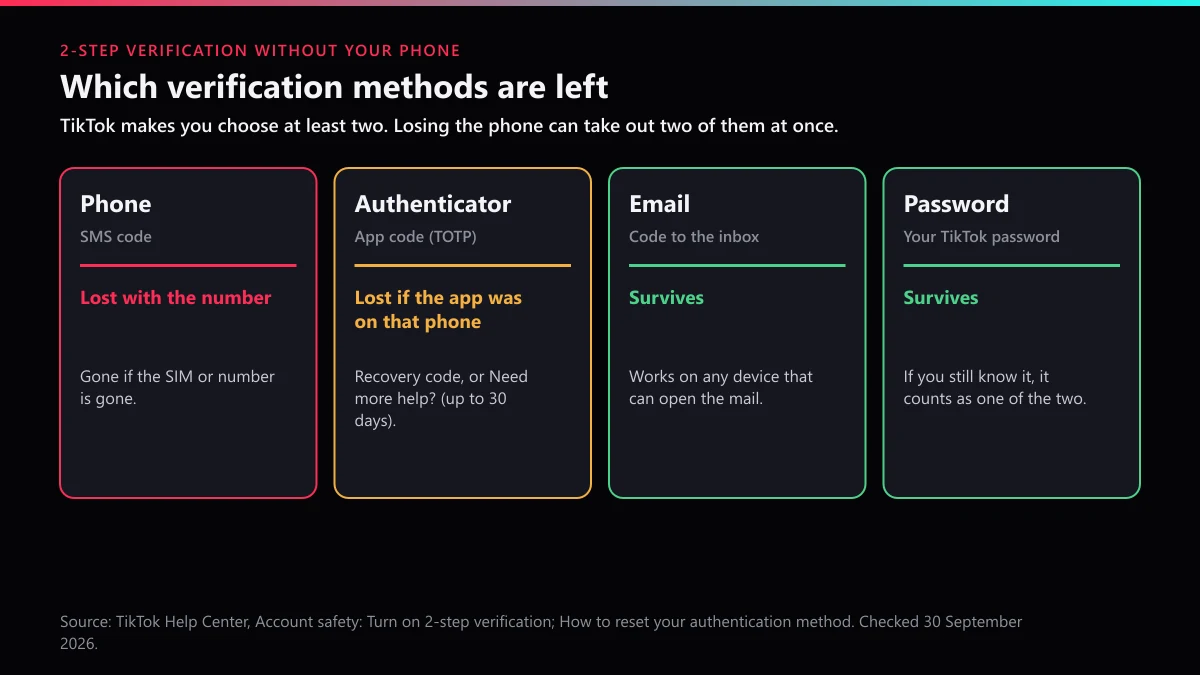
When we read TikTok's Account safety page on 30 September 2026, the 2-step verification menu listed four methods, not three: Phone, Email, Authenticator and, at the bottom, Password. The third-party setup guides in our search results that morning named only the first three. That fourth option matters for this question, because a password you still remember is a method that survives a lost phone.
- Phone. Goes with the number. If the SIM or the line is gone, so is this method.
- Authenticator. Goes with the phone if the app lived only there. TikTok's fix is Can't access the app, then the TOTP recovery code you were shown at setup.
- Email. Survives, as long as you can open that inbox on some device.
- Password. Survives if you know it, and counts as one of the two.
For TikTok account recovery, 2 step verification is therefore either your way back in or the reason you need the form. If the recovery code is lost as well, TikTok's route is Need more help?, and the Account safety page warns the authentication reset "may take up to 30 days."
What should you gather before asking TikTok to verify you?
Anything that matches the account as TikTok has it on record. A reviewer compares your answers with what the account shows, so put the facts together once and give the same ones every time.
- The exact @username, plus a screenshot of your profile if you have one saved.
- Every phone number and email you might have linked, including the one you lost and the date you lost it.
- Old passwords from your browser or password manager.
- The phone model you last used TikTok on, and roughly where you were when you logged in.
- The names of two TikTok friends who can verify you, already warned on another app.
- A contact email you control today, one that is not linked to any other TikTok account.
Keep the list after you get in. It is also the list of what to fix: new number, working email, two 2-step methods that do not live on the same phone.
What if the account, or a copy of it, is now being used against you?
Report that separately; it does not have to wait for your login. Recovery fixes access. It does nothing about a profile already posting as you.
A clone with your photo and name is a fake profile you can report as impersonation, and videos lifted from your account count as stolen content with its own report route. If the copy is used to pressure or threaten people you know, flag it as harassment. Start with deciding between reporting the profile or one post, and use the single-video report when one clip is the problem.
Category choice changes the outcome, so read which violation category fits your case and the report screens in order before sending anything. Copyright goes through a formal copyright takedown notice instead of the in-app button. Our notes on how fast TikTok usually removes reported content set honest expectations, and evidence-based account takedowns are the work we take on when the proof is there. If a hijacker opened a store under your old name, see removing a rule-breaking TikTok Shop.
If you would rather close the account than keep fighting for it, deleting your own TikTok account needs you logged in first, so recovery still comes first.
Who will message you offering to fix this, and what are they selling?
Mostly the same people who sell bans. Once you post about a locked account, strangers turn up promising recovery, and the menu they share usually includes mass report bots, bots that file automated account reports and spam-report bots sold in the same chats. None of them can reach TikTok's recovery system, and any request for your password or a code is the tell.
If revenge crosses your mind, it helps to know what those report tools do behind the scenes, why the number of reports is not what deletes an account, and what really goes wrong when paying someone to remove an account. The difference between impersonation reports and mass reporting is the difference between a report TikTok acts on and one it discounts. Read what genuinely gets a TikTok account banned and why nobody can delete another person's account for you before paying anyone.
If a real rule-breaker is the problem, message us with the profile links. What TikTok Ban Service does is set out on the home page, and the complete library of TikTok reporting guides covers the rest, including a password reset that stalls on the device check.
FAQ
Can I log in to TikTok with my username and password on a new phone?
You can start that way, but on a device TikTok does not recognise it asks for the password plus a one-time code sent by SMS or email. If the number is gone, the email has to receive that code, or you move to Recover your account.
I only remember my old phone number, not the username. Can TikTok still find the account?
Yes. On Recover your account there is a Search by phone number option for accounts that had a number linked. Finding the account is only the first step; you still need a working contact, two friends to verify you, or the Need more help? form.
What if I do not have two TikTok friends who can verify me?
Friends verification needs at least two people you are connected with on TikTok, so skip it and use Need more help? instead. That route is a review by TikTok staff, and resetting an authentication method that way may take up to 30 days.
Can TikTok send the code to the new number I use now?
No. Codes only go to the contacts already saved on the account, and a new number cannot be added from outside it. Get in through the email, a friends check or the form first, then replace the number in Account Information.
I lost my phone and the authenticator app was on it. What now?
Use the other method you picked when you turned on 2-step verification, since TikTok requires at least two. If that is gone too, tap Can't access the app and enter your TOTP recovery code, or tap Need more help? if you never saved it.
My TikTok was created with Continue with Google and I lost that Gmail. Is it over?
Not yet. Recover the Google account first, on a device and in a place where you usually sign in, then use the Google button on TikTok again. If Google cannot be recovered, search your username on Recover your account and ask TikTok to verify you.