30 September 2026 · TikTok Ban Service · 14 min read
TikTok business account recovery: the profile, the ad account, the Shop and LIVE each have their own door
TikTok business account recovery depends on which account is locked, because a business on TikTok runs several: the app profile, an Ads Manager ad account, a Business Center, a TikTok Shop Seller Center login, and LIVE access, which can be pulled on its own. Each has a separate door, and every one of them is free.
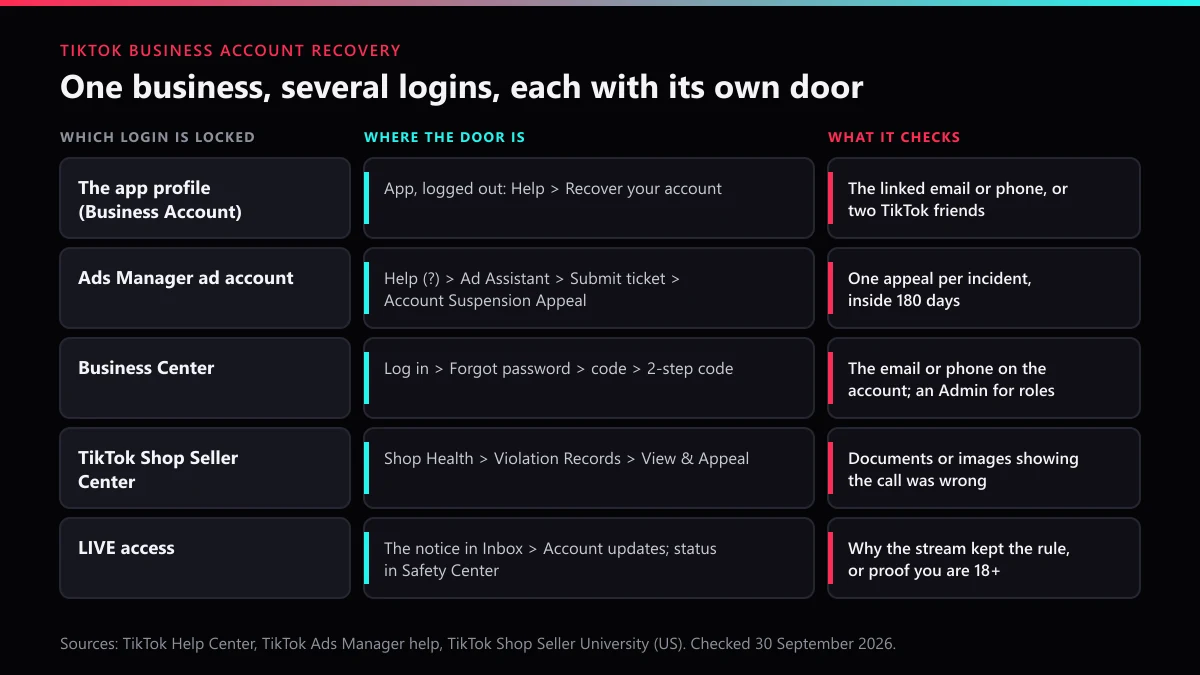
"We lost the TikTok" is one sentence that covers five different problems. It can mean the profile the team posts from, an ad account that stopped spending overnight, the Business Center that held the ad accounts, the Seller Center where orders arrive, or a LIVE button that went grey an hour before a sales stream. TikTok runs these as separate systems, with separate help sites and separate appeal forms.
When we worked through TikTok's Ads Manager help, the US Seller University and the Help Center on 30 September 2026, the most useful line was a quiet one on the ad side: after a first violation, an unresolved suspension becomes permanent at 30 days, and then "You won't be able to appeal this decision." Deadlines like that are why naming the right account comes first.
Which TikTok business account are you actually locked out of?
Look at where the error appears, not at what the business calls it. A message inside the TikTok app points to the profile or to LIVE; an email from TikTok for Business points to Ads Manager or Business Center; a notice in Seller Center points to the Shop. The table maps each one to the door TikTok documents for it.
| What stopped working | Where you sign in | TikTok's door back | Deadline TikTok states |
|---|---|---|---|
| The Business Account profile | The TikTok app | Help, then Recover your account; if banned, the banner's Appeal | None published for appeals |
| An ad account | Ads Manager | Ad Assistant ticket: Account Suspension Appeal | 180 days to appeal; 30 days on a first violation |
| Business Center | TikTok for Business | Forgot password, code, then the 2-step code | None; without the email or phone, no reset |
| The TikTok Shop | Seller Center | Shop Health, then Violation Records, then View & Appeal | 30 days, then 15 days for a second appeal |
| LIVE access | The TikTok app | The notice under Inbox, Account updates | No length published; age appeals 180 days |
More than one row can be true at once. A Shop tied to a banned profile, or an ad account inside a Business Center nobody can log in to, needs each door worked in turn, starting with whichever login controls the others.
Is recovering a TikTok Business Account different from a personal one?
Not at the login. Switching a profile to a Business Account changes its tools, not its sign-in, and no TikTok page we read describes a separate recovery route for business profiles. A locked-out owner opens the app logged out, taps Help, then Recover your account, and proves ownership with the linked email or phone, or with two TikTok friends who approve the request. A banned profile is appealed from the banner that appears at log in.
The trouble is usually who owns the email. Business profiles are often registered to a staff member's address or a phone that left with them, and TikTok's checks only recognise the details on file. The fix is dull and worth doing today: put a company-controlled inbox and number on the profile, and turn on 2-step verification.
If the profile is also linked to TikTok for Business, remember those are two accounts. TikTok's help says it "supports linking a TikTok account to a TikTok for Business account", which means recovering one does not recover the other. It also notes that an Organization Account cannot be used to sign up for TikTok for Business, which catches brands that set up their profile that way.
How do you get a suspended TikTok ad account back?
Appeal from inside the suspended ad account, once, with everything in the first message. TikTok's guide to suspended ad accounts sets out the route:
- Sign in to Ads Manager and open the suspended ad account.
- Click the Help (?) icon, then Submit ticket in Ad Assistant.
- Choose Account/Ad Review, then Account Review, then Account Suspension Appeal.
- Explain what you changed or why the decision is wrong, attach proof, and submit.
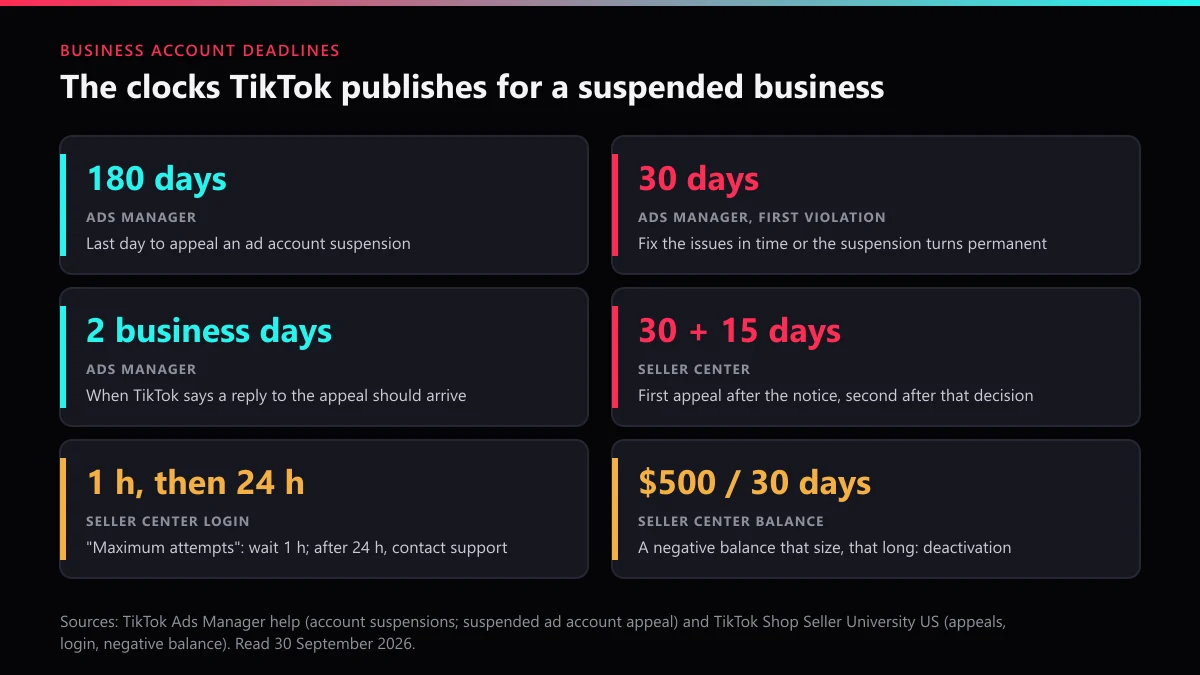
TikTok says a reply "within two business days" is normal, and asks advertisers to "only file one appeal for each incident"; repeat tickets slow the queue rather than jump it. The window closes 180 days after the suspension. While the appeal is open, don't create new ad accounts; the help page says to avoid it, and a fresh account opened to dodge a suspension looks like exactly that. All ads under the suspended account stop, and refunds for a suspended account follow a separate process.
The first-violation rule is the one to diarise. TikTok gives 30 days to fix the issues it names; if they remain, or the appeal is rejected after 30 days, the suspension turns permanent with no further appeal.
What happens when nobody can get into Business Center?
If the admin still has the email or phone, it is a normal reset: Log in, Forgot password, enter the email or phone, send the code, set a new password, then enter the 2-step code. If nobody has either, TikTok's Business Center access page is blunt: "you won't be able to reset your password."
That makes the roles page more important than it looks. Business Center has Admin and Standard members, plus Finance Analyst and Finance Manager roles, and only an Admin can add or remove members, request access to accounts, transfer them, manage 2-step verification or create and claim TikTok Shops. A Business Center with one Admin is one resignation away from being frozen in place. Name at least two.
Ad accounts can be moved between Business Centers, but TikTok's transfer page requires the source Business Center to be "the current owner of the advertiser account", so a transfer also needs a working admin on the sending side. TikTok's role pages don't cover the case where no admin is reachable at all. The route we would try is a support ticket through Ads Manager's Ad Assistant, with company documents showing the business owns the assets, and we would expect questions back rather than a form.
How does TikTok Shop account recovery work?
Split it into two jobs: getting back into Seller Center, and getting a restricted or deactivated shop reinstated. They use different doors.
Shop enforcement is not rare. TikTok told Modern Retail in November 2025 that it removed about 700,000 sellers and blocked 70 million products in the first half of that year.
The login. TikTok Shop's US Seller University, updated 10 July 2026, covers three cases. A forgotten password is reset with Forgot Password? and a code. If only the email is lost, log in with the phone, then change it under Profile, Settings, My Profile, Account Information, Login Information. If both are gone, customer service asks for the shop's SID or Shop Code, a selfie holding a US driver's license, passport or state ID (both sides), and the original phone or email. A "maximum attempts" error means waiting at least an hour; if it persists after 24 hours, contact customer service.
The shop itself. According to Seller University's appeal guide for US sellers, violations are appealed in Seller Center under Shop Health, then Violation Records, then View & Appeal. Sellers get two tries: the first within 30 calendar days of the violation notice, the second within 15 calendar days of that decision, after which it is final. TikTok asks for a clear explanation of why the action was an error, backed by documents, images or video. A win means TikTok Shop "will remove any enforcement actions issued and restore any withdrawn privileges."
Money can shut a shop too. A separate Seller University page says a negative balance of $500 or more for over 30 days ends with "Your account will be deactivated". If your shop is fine but a counterfeit copy of it is not, reporting a counterfeit TikTok Shop seller is the buyer-side route.
Can you appeal a TikTok LIVE access restriction?
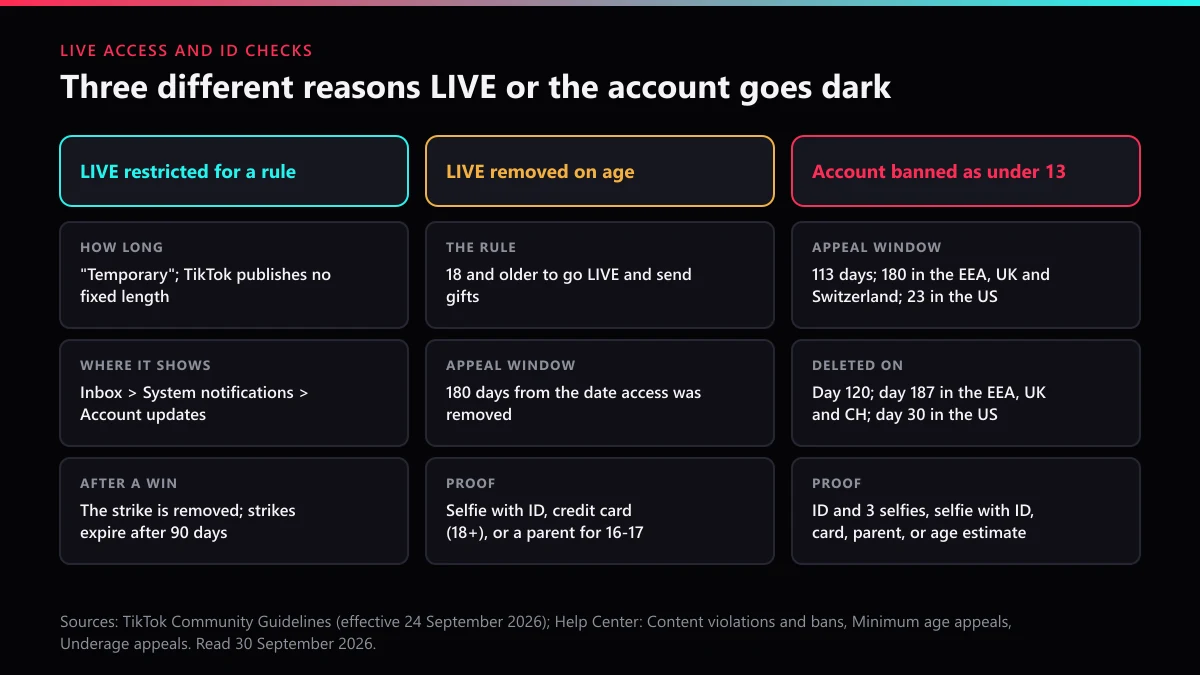
Yes, and it is a feature appeal rather than an account one: TikTok can switch LIVE off while the profile keeps posting. The Community Guidelines in force since 24 September 2026 say a violating stream may be stopped and the creator "could face temporary restrictions from going LIVE". The Help Center adds that TikTok may restrict a feature "while your content is under review". Repeated or serious breaches, including attempts to get around a restriction, can end in an account ban.
A TikTok LIVE access appeal runs through the notice, not through a support inbox:
- Open Inbox, then System notifications, then Account updates, and find the notice naming the stream and the rule. TikTok warns that you may need to scroll across.
- Check the record in Account check: Profile, Menu, TikTok Studio, More tools, Account check. The same screen sits under Settings and privacy, Support, Safety Center.
- Use the appeal option on that notice and say why the stream kept to the rule it names. Follow the status in the in-app Safety Center.
- If the appeal succeeds, TikTok says "The strike will be removed from your account." If it fails, strikes still expire after 90 days.
TikTok publishes no length for a LIVE restriction. "Temporary" is the only word it uses, so ignore anyone quoting a fixed number of days. Two other causes look the same from outside. If LIVE vanished because TikTok thinks the host is under 18, the minimum age to go LIVE and send gifts, it is an age appeal (next section). If LIVE Gifts, coins or reward payments stopped, the cause is a transaction policy ban, which TikTok announces by direct message. For sales streams, the host also answers for third-party tools, which TikTok says "may lead to restrictions on using LIVE or LIVE features".
What does a TikTok ID-suspended account need to be recovered?
In practice, TikTok ID suspended account recovery almost always means an age check: TikTok believes the person running the account is under the minimum age and wants proof before giving it back. If "ID" here means your TikTok ID, the @username, a suspended one is an ordinary ban appeal from the banner. For an account banned as under 13, TikTok's Underage appeals article gives the route: open the appeal notification, tap Appeal and follow the instructions.
The clock is short and depends on location. The owner can appeal and download data for 113 days, 180 days in the EEA, UK or Switzerland, and 23 days in the US. With no appeal, or after a refused one, TikTok deletes the account on day 120, day 187 or day 30 respectively. A US business profile flagged this way has a little over three weeks.
TikTok accepts several kinds of proof:
- a photo of an ID plus three selfies taken from different angles;
- a real-time selfie with ID through its partner Incode, with 15 minutes to finish;
- credit card authorisation, for anyone 18 or over;
- facial age estimation by a third party, which sends TikTok the estimate and deletes the selfie;
- for 13 to 17-year-olds, a parent or guardian confirming by card, or a photo with a parent over 25 holding a "TikTok proof of age" note.
On data, TikTok says "We won't keep a copy of your ID if provided" and starts deleting submitted selfies and ID photos, unless a local law requires it to keep them. Incode is different: it keeps what you submit until you delete it through your Incode account. When only a feature was age-locked, such as livestreaming or buying coins, the Minimum age appeals page allows 180 days from the date access was removed, and TikTok keeps that appeal record for 90 days.
Did a competitor's reports get your business suspended?
Probably not on their own, and the appeal works best if you assume they didn't. The enforcement chapter of TikTok's Community Guidelines, in force since 24 September 2026, says "Additional review will occur if content gains popularity or has been reported." A wave of reports buys a second look at your content; the decision still rests on what that content shows. Our explainer on why report volume alone doesn't delete an account goes through the numbers.
Businesses in crowded niches do get targeted. Sellers advertise a mass report bot, report bots aimed at whole accounts and spam report bots openly, and some of the same storefronts sell the reverse, as our look at sellers who charge to remove rival accounts shows. TikTok's US Terms, updated 15 July 2026, bar helping anyone "submit appeals, reports, notices or complaints which are unfounded", and its guidelines "strictly prohibit automation tools, scripts, or other tricks designed to bypass our systems." Our breakdown of what those mass report tools really send explains why they rarely move anything.
So write the appeal about the content TikTok named, and match it against the violations that actually end in a TikTok ban. Appeals are worth filing: in TikTok's EU transparency report for January to June 2026, users challenged 11,728,557 content and visibility decisions and TikTok reversed 6,019,911 of them, just over half.
What should a business have ready before it files anything?
One complete appeal beats three thin ones, on every desk. Gather this first:
- The exact notice. A screenshot of the violation or suspension message, with the date. In the app it sits under Inbox, then System notifications, then Account updates.
- The identifiers. Your @username, the ad account ID, the Business Center ID, and the Seller Center SID or Shop Code, whichever apply.
- Proof the business is yours. Registration documents, invoices for the ad spend, a trademark certificate if the dispute is about your brand.
- Proof about the content. Supplier invoices or authorisations for Shop listings, licences for music or footage, the original files for videos TikTok flagged.
- A short account of what changed. If you fixed something, say what and when; TikTok's ad appeal asks for exactly that.
Send ID only inside TikTok's own flows. Anyone who messages the business offering to "escalate" a case and asks for a selfie with a passport is running the scam, often from one of the fake accounts posing as TikTok support. No one sells a faster lane: every door on this page is free.
When does a recovery turn into a takedown?
When someone else is using what you lost. A hijacked or suspended business profile is often followed by a clone: same logo, same name with an extra underscore, taking orders by DM. That is impersonation, and how TikTok weighs impersonation reports against mass reporting explains why a brand owner's report counts for more than a crowd's. Start by reporting the copycat profile or one of its videos, or by flagging a single misleading video if that is all there is.
Product demos and ads that turn up on another shop are an IP problem: reporting product videos someone reposted covers copyright, and a trademark or copyright takedown notice is the formal version. If the clone grabbed your handle while you were locked out, read up on getting a squatted brand @handle released. Where the whole profile exists to deceive, requesting an account takedown for the clone is the next step.
Reports land better with the right label. Picking the violation category that fits and knowing how to submit a TikTok report with evidence attached matter more than speed, though our note on how quickly a TikTok removal can realistically happen sets expectations. If staff or customers are being abused by the clone, add a harassment report for the people being targeted.
Some businesses decide an old profile isn't worth saving. Closing an old business profile yourself needs a working login, so recover it first; removing an account you don't control is a reporting job, not a delete button.
Browse our index of TikTok reporting and takedown guides for the rest, read what TikTok Ban Service does and turns down, or send us the clone or listing links when you have them.
FAQ
Can I recover a TikTok business account without the email or phone?
It depends on the login. The app profile can be approved by two TikTok friends instead. Seller Center support accepts the SID or Shop Code, a selfie holding ID and the original phone or email. Business Center's help says that without the email or phone you won't be able to reset the password.
How long does a TikTok ad account suspension appeal take?
TikTok says a reply should arrive within two business days. You have 180 days from the suspension to appeal, but after a first violation, issues left unfixed turn the suspension permanent after 30 days, with no further appeal.
How many times can a TikTok Shop seller appeal a violation?
Twice. The first appeal is due within 30 calendar days of the violation notice and the second within 15 calendar days of that decision. After the second decision, TikTok Shop treats the outcome as final.
How do I file a TikTok LIVE access appeal?
Open the notice under Inbox, System notifications, Account updates and appeal from there, then track it in the Safety Center. If LIVE was removed because TikTok thinks you are under 18, use the minimum age appeal, which stays open for 180 days.
Does TikTok keep the ID I send to get a suspended account back?
For age appeals, TikTok says it won't keep a copy of your ID and starts deleting submitted selfies and photos, unless a law requires retention. The selfie-with-ID option run by Incode is different: Incode keeps the data until you delete it.
Is TikTok Shop account recovery the same as recovering the TikTok app?
No. Seller Center has its own login, its own reset page and its own customer service, so each account is recovered separately. Recovering the app profile does not restore a shop, and a shop appeal does not unlock the profile.
Can a paid service get a TikTok business account back faster?
No. Every door on this page is free, and TikTok's ad appeal page asks for one appeal per incident, warning that repeat appeals delay processing. Anyone selling priority access is selling something TikTok does not offer.