30 September 2026 · TikTok Ban Service · 9 min read
How to recover an old TikTok account: find it first, then find the key
To recover an old TikTok account, first check it still exists by opening tiktok.com/@yourname in a logged-out browser. Then work out how you signed up years ago: phone, email, or a Google, Apple, Facebook or X button. Log in that same way. If none of those reach you, TikTok's Need more help? form is the last route.
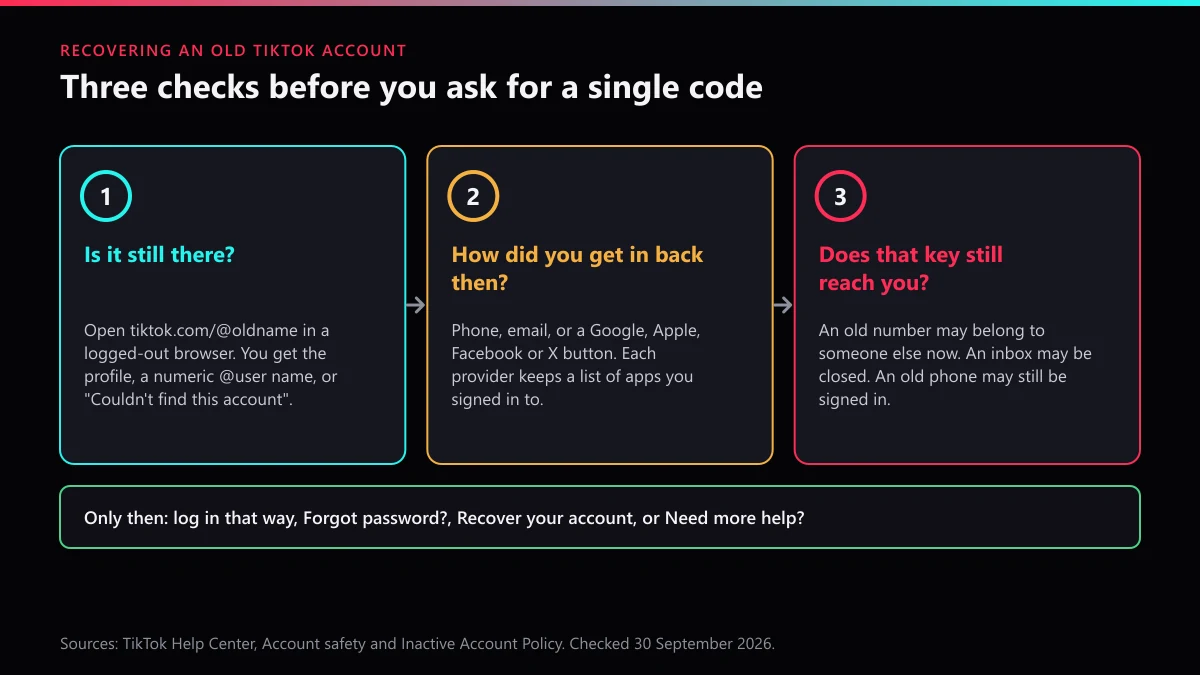
An old TikTok account rarely gets stuck at the password. It gets stuck one step earlier, because almost nobody remembers what they typed into a sign-up screen in 2019. Was it the school email? The number from two phones ago? A Google button pressed without reading? A reset only works once you know which key the account expects, so most of this page is about finding that key.
TikTok's own rules help here. Its Inactive Account Policy says inactive users "will not be blocked, removed, or considered as inauthentic." Age alone does not get an account deleted. What can change is the name on it.
Trying to recover an old TikTok account? Check it still exists
Probably it does, unless someone deleted it or TikTok banned it. The quickest test takes ten seconds: open a private browser window, type tiktok.com/@ followed by the username you remember, and read what loads. Because you are logged out, you see what a stranger sees.
When we ran that test on 30 September 2026 with a made-up name, all we got back was "Couldn't find this account" and a nudge to browse trending creators. Nothing else.
That one message covers several very different situations, so read it against the table rather than on its own.
| What loads | What it usually means | Your next move |
|---|---|---|
| Your profile, under the name you remember | Account and username are both intact | Go to the sign-up question below |
| Your videos, but under @user plus a string of digits | The username was reset after 180 days or more without use; the account itself is fine | Log in by phone, email or sign-in button, never by the old @name |
| "Couldn't find this account" | You renamed it later, the name was reset, it was deleted, or it was banned | Check an old share link or a saved video before assuming the worst |
| Posts, a bio or a name you never wrote | Someone else has been inside it | Treat it as a hacked account, not a forgotten one |
Old share links beat memory. Scroll back through chats where you once sent your own videos to friends: if a link still plays, the account exists, and the page shows the name it carries today. Clips saved to your camera roll help too, since videos downloaded from TikTok carry the creator's @username as a watermark. A friend's following list or a search for your old display name can do the same job.
There is also a lookup inside the app. The Help button at the top of the login screen leads to Recover your account, where TikTok lets you enter a username or email and tap Search, or search by phone number instead. A match tells you which detail the account is tied to before you can even get in. And for an account that was banned rather than lost, TikTok's Account safety page says a banner appears the next time you open the app, with an Appeal button under it.
Which sign-up button did you press back then?
For most old accounts, this is the real question. TikTok lets people join with a phone number, an email, or another platform's login, and each choice leaves a trail outside TikTok. Check those trails before touching Forgot password?, because an account opened through Google or Apple has no TikTok password to reset.
| If you might have used | Where to look | What a hit tells you |
|---|---|---|
| myaccount.google.com/ | TikTok appears if that Google account was ever used to sign in | |
| Apple | iPhone Settings, your name, Sign in with Apple | TikTok appears, and whether it only ever saw a hidden relay address |
| Settings & privacy, then Apps and websites | Whether TikTok is still connected to that Facebook profile | |
| X (Twitter) | Settings, Security and account access, Apps and sessions, Connected apps | Whether TikTok holds a login through that X account |
| Email or phone | Every inbox you had then, searched for "TikTok" and "musical.ly" | Which address received the sign-up and code emails |
Google documents the first row on its linked apps help page. The Apple row catches people out: Sign in with Apple can hide your real address and forward the app's mail through a relay, so the "email" TikTok holds may be one you never typed. Apple's page on Sign in with Apple apps explains where that forwarding points, which is the inbox to search.
Started on musical.ly? Search for that name too. The two apps merged in August 2018 and, in TikTok's own merger announcement, existing accounts, content and fans would "move automatically" to TikTok. A 2017 musical.ly profile is the account you are trying to open now, with the same sign-up details.
Then check the drawers. A phone or tablet you used back then may still be signed in. Charge it, put it on Wi-Fi, open TikTok, and go to Profile, the menu, Settings and privacy, Account, Account Information: that screen shows the phone number and email on file.
The phone number problem nobody warns you about
A number you dropped years ago is probably not yours anymore. The US Federal Communications Commission put the scale at roughly 35 million numbers "disconnected and aged each year" in its 2017 inquiry into reassigned numbers, and federal numbering rules let a carrier give a residential number to someone new after no less than 45 days and no more than 90.
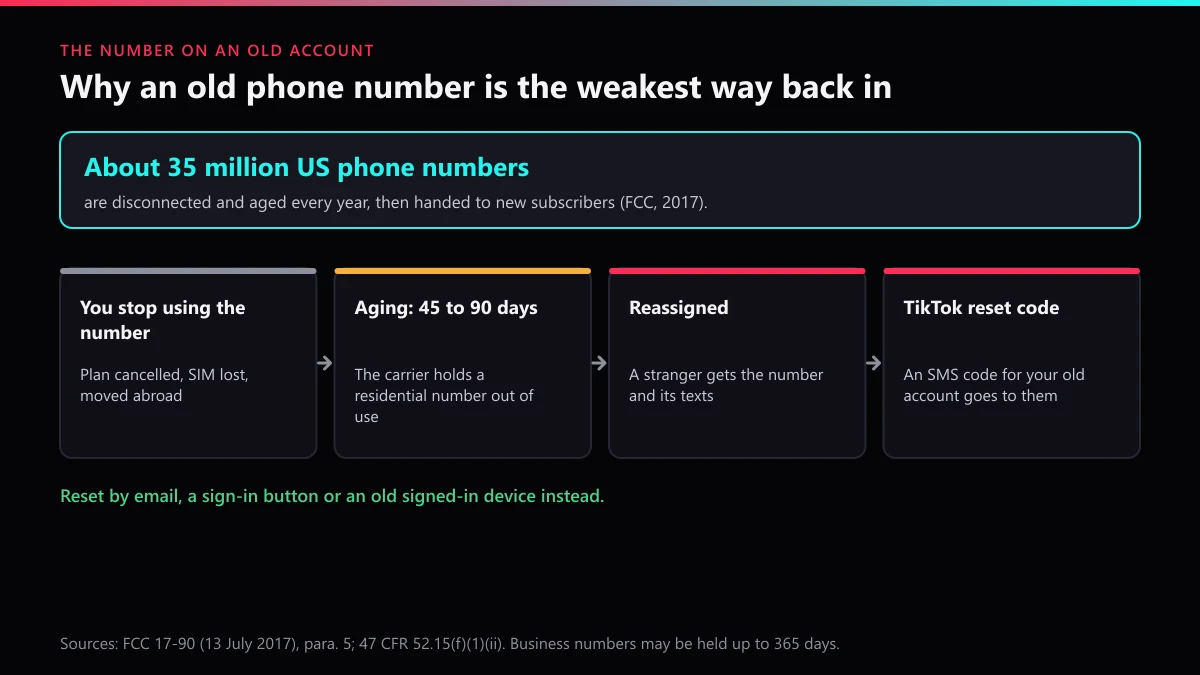
For an old TikTok account that has two consequences.
An SMS reset code sent to that number goes to whoever holds it now, so it will never reach you. And the new holder would receive the same code if anyone typed your username into the reset screen, which is a good reason to get back in and swap the number soon rather than someday.
Other countries set their own recycling periods, but carriers everywhere reuse numbers. A number you have not paid for in a year is best treated as a stranger's, and leave the phone option until everything else has failed. Where the lost number is the whole problem, our page on TikTok account recovery without the phone number goes through each way it can go missing.
How to recover old TikTok account access, in order
Start with the routes that need nothing from TikTok's support team, and move down only when one fails. People trying to recover old TikTok account logins often begin at the bottom with a form, then wait weeks for something a drawer phone could have settled in five minutes.
- Open TikTok on any old phone or tablet you used back then. If it is still signed in, add a current email and phone in Account Information straight away.
- Try each sign-in button your checks turned up, with the exact Google, Apple, Facebook or X account the provider listed.
- Choose Use phone / email / username, enter the email you found, and tap Forgot password? if the password is gone. Our TikTok password recovery walkthrough covers that screen and the unrecognised-device error.
- Use the old phone number only if it is still in your name.
- Tap Help, then Recover your account, and search by username, email or phone. On the account page, Can't access these? offers Ask friends to verify.
- When all of that fails, use Need more help? and send the details listed in the next section.
Friends verification is where old accounts struggle. TikTok needs at least two friends to confirm you from their own accounts within a set period, and it caps how many requests you can send each day. Your 2020 follows may have left the app. In that case skip this step and go to the form.
Once you are back in, expect a password prompt. TikTok compares its users' logins with lists of email addresses and passwords "stolen and published online" and asks for a change when it finds a match. An account last opened years ago, with a password reused across old sites, is exactly the kind that turns up on those lists. Change it, add a current phone and email, and switch on 2-step verification before anything else.
Name reset to @user and digits? Open Edit profile and try the old one. Should nobody have taken it while you were away, you can have it back; if someone did, TikTok says "in most instances" it cannot reassign a username. Our note on claiming a TikTok username someone else holds explains the trademark exception.
What to put in the request when every door is shut
Everything that ties you to the account as it looked back then. TikTok's reviewers compare your answers with what the account holds, and an old account holds old details, so today's email and number help less than you might expect. Gather these before opening the form:
- Every username the account may have had, including the @user number if the profile now shows one
- Every email you used around the sign-up year, including school, work and Apple relay addresses
- Every phone number, dead ones included, with the country code
- The sign-up method and roughly the year you joined
- The phone or tablet models you used TikTok on
- A saved video with your watermark, or a screenshot of the profile
Write it once and send one complete request. TikTok's help page on email and phone numbers says a reset through Need more help? "may take up to 30 days," and an old account with thin evidence sits at the slow end of that.
When the old account really is gone
Sometimes every check points the same way: the profile will not load, no old link plays, the in-app search finds nothing, and no ban banner appears. The account was most likely deleted. A deletion leaves an account deactivated for 30 days before TikTok erases it, and none of its help pages describes a way back after that. Got in after all, and would rather close it properly? here is how deleting your own TikTok account works.
What you can still act on is what others do with the leftovers. Abandoned profiles are raw material for impersonators, who repost your old clips under your old name and message the followers you built. You can flag the clone as a fake account, have your reuploaded clips removed as stolen content, and use TikTok's harassment reporting if the copy is being used against people you know.
Deciding whether to report the profile or one post changes what TikTok reviews; reporting a single TikTok video is the narrower route. Matching the clone to the right violation and the in-app report screens, step by step cover the mechanics. Old clips you own can come down through a copyright takedown notice, and how fast removals really happen sets expectations. Our write-up on why impersonation reports beat mass reporting explains the difference, and where a copy keeps returning, account takedowns we file through official channels are the last step.
Who not to trust with an old account
Anyone who wants your login codes, or a fee to "unlock" it. Nobody outside TikTok can restore an account, and owners of old ones make easy targets because they are already unsure of their own details. We compared what paid recovery helpers can and cannot reach if you are weighing one.
The same sellers usually offer the opposite service too. Report-bot packages sold by volume, bots that file account reports for you and spam-report scripts all promise removals through sheer numbers. Our teardown of a mass report tool and the piece on report counts and account deletion show why that fails, and the risks of paying for a removal are their own topic.
A stranger now running your old name is a separate problem. To get that profile gone, start with the violations that really end TikTok accounts and what you can and cannot do about someone else's account. A clone that sells through a Shop is covered under taking down a clone's TikTok Shop.
Old account out of reach, and a copy of it causing harm? Tell us what you found. The TikTok Ban Service home page explains what we take on, and every TikTok guide we publish sits in one list.
FAQ
Does TikTok delete accounts that have not been used for years?
Not for inactivity alone. TikTok's Inactive Account Policy says inactive users will not be blocked or removed. After 180 days without use the username may be reset to a random number, but the account, its videos and its followers stay where they were.
How do I find my old TikTok account if I forgot the username?
Look for a video you once saved from TikTok, because downloads carry the @username as a watermark, or an old share link in a chat. You can also tap Help on the login screen, then Recover your account, and search by the email or phone number you used.
Can I get my old username back after TikTok reset it to numbers?
If nobody has claimed it since, you can type it back in Edit profile once you are logged in. If another account took it, TikTok says that in most instances it cannot reassign a username, apart from cases such as a valid trademark claim.
Can I recover an old musical.ly account on TikTok?
Yes, the same way as any TikTok account. When musical.ly merged into TikTok in August 2018, existing accounts moved over automatically. Search your old inboxes for musical.ly emails to find the address it used, then log in or reset with that.
How does old TikTok account recovery work without the old phone number?
Leave the phone out of it. Use the email on the account, the Google, Apple, Facebook or X login you signed up with, or a device that is still signed in. If none of those work, the Need more help? form can reset the login details once TikTok verifies you, which may take up to 30 days.