4 October 2026 · TikTok Ban Service · 11 min read
When you report someone on TikTok, does it tell them? What each side sees next
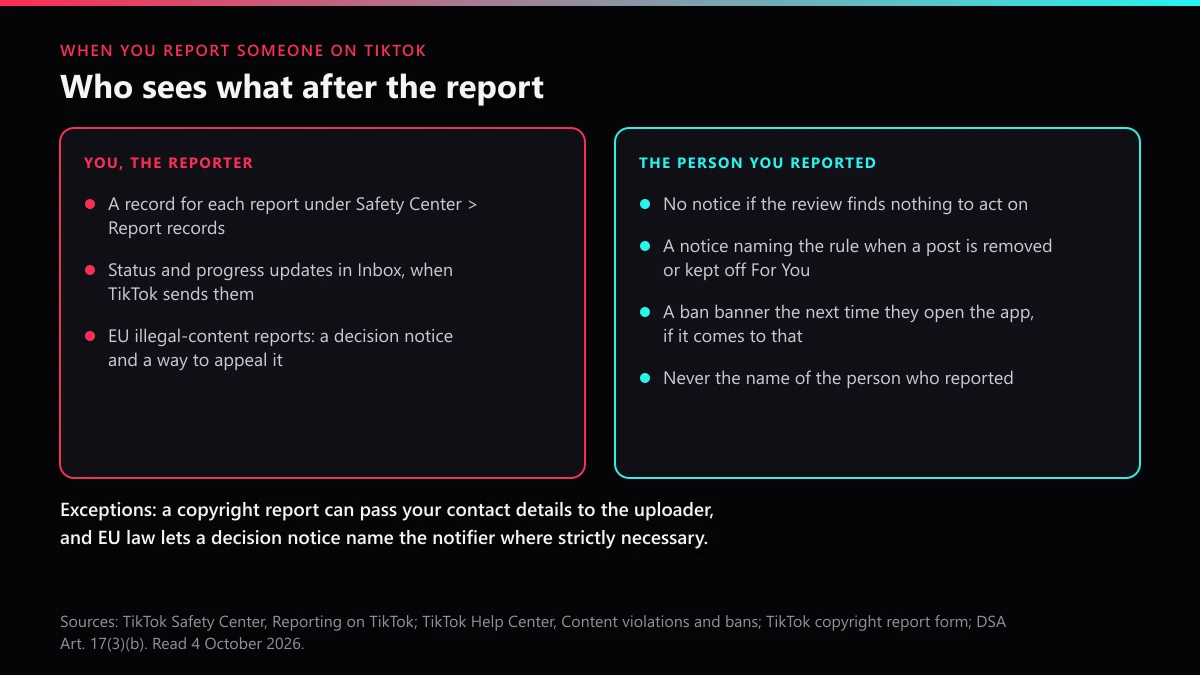
No. When you report someone on TikTok, it does not tell them who you are: TikTok's reporting page says it will not disclose your identity to the person whose content or account you report. If the review finds a violation, they get a notice naming the rule, never the reporter. You can follow your report under Report records in the Safety Center.
Most people who ask this are about to report someone they know. An ex, a classmate, a former business partner, someone who will remember the argument. So the real question is whether anything in the process points back at you.
We read TikTok's own pages on 4 October 2026 rather than the guides that copy each other. The Safety Center page called Reporting on TikTok settles the identity question in one sentence. It also lists the notices that go out after a report and gives the in-app path to your report history. Until that morning we had only seen that path in creators' how-to clips, never on a TikTok page. We also pulled the response-time series out of the data file behind TikTok's latest Community Guidelines Enforcement Report, which runs from early 2023 to March 2026. The next quarter's file still returned a 404 when we checked.
Does TikTok tell someone if you report them?
No. TikTok's page on reporting on TikTok says the company "will not disclose your identity to the person whose content or account you're reporting." The same page covers the moment a post is removed or kept out of the For You feed: TikTok may tell the creator which rule it broke, but the notice never says who reported it. Appeals do not open the file either. TikTok says it won't reveal who reported content through the appeals process.
What the other person can get is news about their own content. The Help Center article on content violations and bans says the account owner is notified when TikTok finds a violation and acts on it. Those notices land in Inbox, under System notifications and then Account updates, and name the rule. When the review finds nothing, no notice goes out, so a report that fails leaves no trace on their side. A banned account sees a banner the next time it opens the app.
Is reporting someone on TikTok anonymous in every case?
For community reports, yes. Two formal routes work differently, and your situation can give you away even when TikTok does not.
- Copyright and trademark reports. These are legal notices, filed on a separate form. The TikTok intellectual property policy says TikTok may give the user information about your report, such as the copyright owner's name, and the copyright form warns that your contact details may be shared with the person who posted the content.
- EU illegal-content notices. The Digital Services Act, Article 17(3)(b), lets the statement of reasons sent to the poster include the notifier's identity "where strictly necessary". TikTok does not say when it uses that clause.
- Context. If you were the only other person in a chat, or the one arguing in their LIVE comments an hour before it was cut, they can guess. TikTok keeps your name out of the notice. It cannot hide the timing.
So when you report on TikTok, is it anonymous? On paper, for everything except intellectual property claims. In practice, as anonymous as the circumstances let it be.
What happens if you report someone on TikTok, from tap to decision?
A review starts, and the result depends on what you reported, not on who you are or how many people joined in. This is the sequence TikTok describes across its reporting page and Help Center.
- Your report is logged against one thing: a video, comment, LIVE, message or profile, with the reason you picked. The reason steers the review, so TikTok's violation categories explained is worth a minute before you tap Submit.
- TikTok checks the item against its Community Guidelines, using automated systems and human moderators, and may also look at whether it is illegal in one or more countries.
- The reviewer removes it, makes it ineligible for the For You feed (sometimes harder to find in search too), or leaves it alone.
- If action was taken, the owner gets a violation notice and the option to appeal. You may get a status update in Inbox, and the report appears in your history either way.
- For youth sexual exploitation, TikTok also reports to the National Center for Missing and Exploited Children, and it goes to law enforcement when there is a specific, credible and imminent threat to someone's life.
One detail explains why a report is not the only route to a review. TikTok says its systems may send posts with a high number of views to moderators anyway. Popular content gets a second look whether anyone reported it or not, which is also why one report about a viral clip can look pointless. Someone may already have checked it. If you want to see the request itself step by step, the reporting steps for accounts and videos cover the screens.
What happens when you report a video, an account, a comment or a LIVE on TikTok?
The review process is shared. What TikTok can take away, and what the owner is shown, changes with the thing you report.
| You report | What TikTok can do | What the owner is told | What you can check |
|---|---|---|---|
| A video or photo post | Remove it, or keep it out of the For You feed and some search results | A removal notice naming the rule; For You decisions show in the post's analytics | Report records; a removed video stops playing |
| An account | Act on the posts behind the report; ban the account for a severe violation, deceptive impersonation, being under the minimum age or repeated breaks | A notice per violation; a ban banner if banned | Report records; the profile itself |
| A comment | Remove the comment; repeated breaks can restrict the person from commenting | A notice; their Account check can show they are restricted from commenting | Report records; the comment leaves the thread |
| A LIVE | Stop the session; restrict the host from going LIVE for a time | The stream ends with a notice | Report records |
| A direct message | Remove it; restrict the sender's messaging | A notice about the message | Report records; "Report and block" also blocks them |
What happens when you report a video on TikTok?
The likeliest outcomes are removal or a quieter penalty most reporters never notice. A video ruled ineligible for the For You feed stays on the profile but stops being recommended. Its creator sees the reason in the post's analytics and can appeal there. From your side, the clip still plays, so it looks as if nothing happened. If the problem is one clip, reporting one TikTok video walks through choosing the reason. If the video is your own footage reposted by someone else, it goes through reporting a reupload of your video or a copyright takedown notice. That is the one route where your name can reach them.
What happens when you report a TikTok account?
The reviewer looks at the profile and at the content behind your reason, then acts on whatever breaks a rule. An account report is strongest when the whole account is the problem: a profile pretending to be someone, an account set up only to harass, or one run by a child under the minimum age. For a fake profile using your name, the impersonation route asks for proof of who you are. Copies of your profile that turn up alongside a burst of reports point to report waves paired with impersonation, which leave their own evidence.
What happens when you report a comment on TikTok?
The comment is checked on its own and removed if it breaks a rule. Comment enforcement runs at a scale videos don't come close to: TikTok removed 237,517,128 comments in January to March 2026, according to the same enforcement report. Repeat offenders can lose commenting for a while, and that shows in their Account check. Creators dealing with a pile-on can select up to 100 comments under their own video and report them in one go. Your reports also shape your feed. TikTok's guidelines say comments are sorted partly on your past replies, likes and reports. A sustained campaign belongs in a harassment report that shows the pattern.
What happens when you report a LIVE on TikTok?
The stream can be cut while it is still running. TikTok's guidelines say a session may be stopped and the creator could face temporary limits on going LIVE. Reporting a LIVE works only in the app: tap Share, then Report, pick the reason and submit. In January to March 2026, TikTok suspended 50,791,858 LIVE sessions and restored 4,171,677 after appeal. A note in the data file adds a detail few hosts expect. A restored livestream does not reopen. The host can only repost it as a video.
If you report a TikTok account, will it be deleted?
Not by your report. A report can lead to a ban, but deletion is something else, and only the owner can start it, through the steps for deleting your own TikTok account. That is why deleting someone else's account always comes back to what they posted, and why paid account removal offers sell a decision only TikTok makes. Counting reports doesn't change it either; why report counts do not decide bans goes through the numbers.
TikTok's Help Center lists what ends an account permanently: child sexual abuse material, threats or promotion of violence, non-consensual sex acts, trafficking, real-world torture, being under age, deceptive impersonation, dodging an earlier ban, repeated violations, or an account that exists only to break rules. Even then, the owner can log in to appeal and download their data until TikTok deletes it under its retention policy. Appeals matter. In TikTok's EU transparency report for January to June 2026, 810,860 complaints against account suspensions or terminations led to 377,235 reversals, close to half. A full account takedown backed by documented violations is built to survive that step, and how a TikTok ban actually reaches an account covers the rest. If you were hoping the handle frees up afterwards, check whether a banned TikTok username can be claimed before planning on it.
How to see TikTok report status and your report history
TikTok keeps a list of what you reported. The reporting page says TikTok may update you on a report's status and progress in your inbox, and that you can view your report history from your settings. The path, as TikTok gives it:
- In the TikTok app, tap Profile.
- Tap the Menu ☰ button at the top, then Settings and privacy.
- Tap Support, then Safety Center.
- Tap Report records, then select a report.
That is how to check report status on TikTok for anything you reported in the app while signed in. Your TikTok report history lives there, not in your notifications, and only you can see it. Two routes sit outside it. Reports sent through TikTok's online feedback form get their reply by email, and the form says the information will only be used to respond to your report. EU users who file through the illegal-content page are told the decision, including when TikTok decides the content is not illegal, along with how to appeal.
How to see videos you reported on TikTok after they come down
Report records is the list. TikTok's pages describe no separate gallery, so how to see reported videos on TikTok comes down to opening that record. If the video was removed, the record may be the only trace left in the app, because the clip no longer plays for anyone, you included. Save the link and take screenshots before you report. If the account deletes the video itself, or the case later goes to the police or a lawyer, your copy is the evidence. Reporting is also where many people learn how to write a report that holds up, since a clear reason and an exact link are what a reviewer can act on.
How long does it take TikTok to review a report?
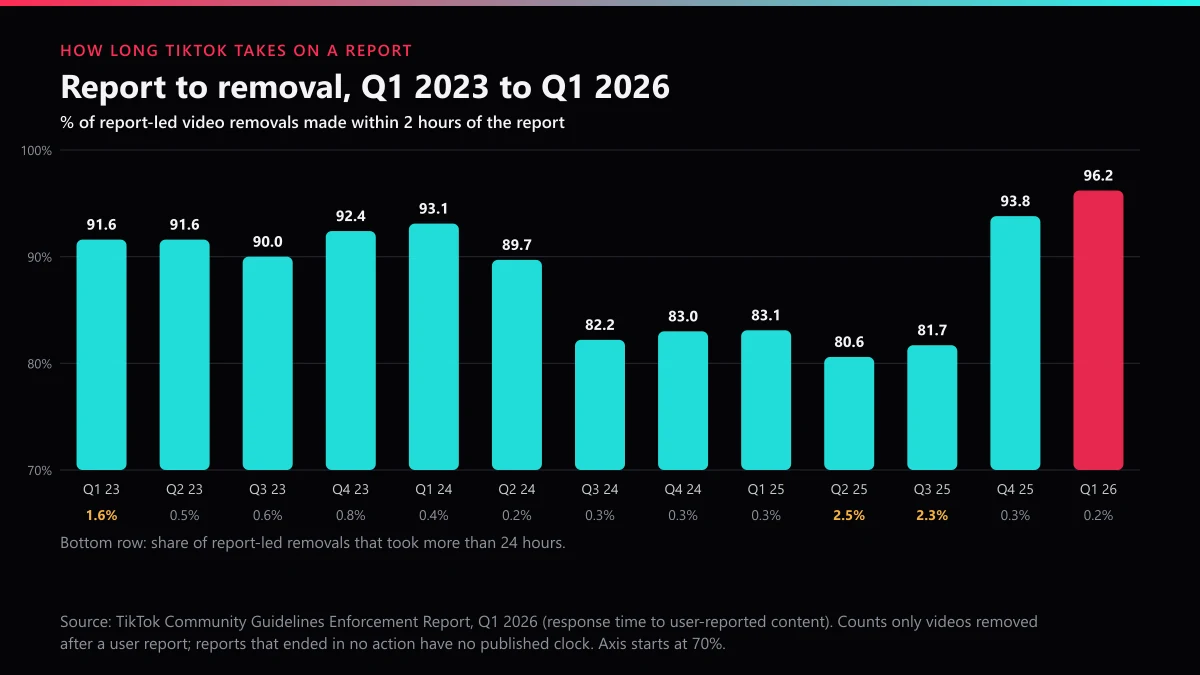
When a report ends in removal, usually under two hours. In TikTok's Community Guidelines Enforcement Report for January to March 2026, 96.2% of videos taken down after a user report came down within two hours of the report entering moderation. Only 0.2% took more than a day. The clock has not always run that fast:
| Quarter | Under 2 hours | 2 to 8 hours | 8 to 24 hours | Over 24 hours |
|---|---|---|---|---|
| Jan–Mar 2024 | 93.1% | 4.0% | 2.5% | 0.4% |
| Apr–Jun 2024 | 89.7% | 5.7% | 4.4% | 0.2% |
| Jul–Sep 2024 | 82.2% | 9.2% | 8.3% | 0.3% |
| Oct–Dec 2024 | 83.0% | 7.6% | 9.1% | 0.3% |
| Jan–Mar 2025 | 83.1% | 7.7% | 9.0% | 0.3% |
| Apr–Jun 2025 | 80.6% | 7.2% | 9.7% | 2.5% |
| Jul–Sep 2025 | 81.7% | 7.3% | 8.7% | 2.3% |
| Oct–Dec 2025 | 93.8% | 3.3% | 2.6% | 0.3% |
| Jan–Mar 2026 | 96.2% | 2.0% | 1.6% | 0.2% |
Read it with the limits TikTok attaches. The table counts only short-form videos removed after a user report. A report that ends with no violation has no published clock at all, and neither do comments, LIVEs or accounts. TikTok also notes that review times move with volume and complexity, and mid-2025 shows it: more than 2% of removals took over a day in two straight quarters.
How long does TikTok take to respond to a report?
There is no promised reply time. TikTok says it may update you in your inbox, and the word is "may". In practice, check Report records a day after you file. The firmer clocks come from law and from specific forms. In the EU, Article 16 of the Digital Services Act makes TikTok tell the person who filed an illegal-content notice what it decided, without undue delay, and how to seek redress. TikTok's form for cyberbullying of under-18s in the US promises updates by SMS or email within set periods. For how fast a takedown can realistically go, those are the routes to know about.
What can you do when TikTok finds no violation?
Check the reason first. A video reported as spam but actually threatening someone was reviewed against the wrong rule, and a fresh report under the right one is fair game. Repeating the same report doesn't help, since ten reports of one video hand the reviewer the same video ten times.
In the EU, reporters can also challenge the decision itself. TikTok's DSA transparency report for January to June 2026 counted 15,590 appeals from people whose reports led to no action, and 1,704 of those were reversed, roughly one in nine. That is a narrow door, but it is a real one.
What does not work is volume. TikTok's US Terms of Service, section 3.4, forbid filing unfounded reports or helping anyone else do so. The products sold around that rule, from mass report bot sellers and account report bots to cheaper spam report bot listings, all buy review requests and nothing more, as what a mass report tool really sends shows. A seller pushing counterfeit goods is a different case again, handled through a TikTok Shop seller's removal.
How do you stay out of view after reporting someone you know?
Say nothing and block quietly. TikTok's Help Center says a blocked person is not notified, and the Report and block option in direct messages does both in one step. The block shows only if they go looking for your profile. Telling them, or posting about it, gives away what TikTok kept to itself.
Keep your own record before you report: links, screenshots, dates. If anything in the messages amounts to a threat, contact the police as well as TikTok. TikTok refers specific, credible and imminent threats to law enforcement, but your local police will need your evidence, not TikTok's file.
We are an evidence-led TikTok reporting service, and we file only on genuine violations. Browse the full set of TikTok reporting guides for other routes, or send the case to our team with the profile links and the posts that break the rules.
FAQ
Can someone see who reported them on TikTok?
No. Nothing in the app shows a reported person who filed the report, and TikTok says it will not disclose your identity to them. Their notice names the rule they broke and offers an appeal. The exceptions are copyright and trademark claims, where your name or contact details can be passed on.
Do you get a notification when someone reports your TikTok?
Only if TikTok acts. A report that finds no violation sends you nothing, so most reports against an account are never seen by its owner. If a post is removed or kept off the For You feed, the notice arrives in Inbox under System notifications and Account updates.
Does TikTok tell you what happened to your report?
Sometimes. TikTok says it may send status and progress updates to your inbox, and every report you filed in the app is listed under Settings and privacy, Support, Safety Center, Report records. Open the entry to see where it stands. TikTok does not send reporters a separate ban notice.
If I block someone after reporting them, will they know?
Not from TikTok. The Help Center says a blocked person is not notified, and the Report and block option in direct messages does both at once. They may notice they can no longer find your profile, so block after you have saved the links and screenshots you need.
Can reporting someone on TikTok get me in trouble?
Not for an honest report. A good-faith report about content that turns out to be fine just ends with no action. What breaks TikTok's US Terms of Service, section 3.4, is filing reports you know are unfounded, or helping someone else do it, which is what paid report services sell.
How to check report status on TikTok for a report sent from the web form?
Watch your email. Report records covers only what you reported inside the app while signed in; the online feedback form replies to the address you gave and says it uses that information only to respond to you.
Why is the account still up after I reported it?
Because the review found no violation, found one that only cost a post, or is still running. Check Report records first. If the reason you chose did not fit what the account did, report again under the right one. EU users can also appeal a no-action decision.