26 September 2026 · TikTok Ban Service · 14 min read
How to report a scammer on TikTok so the account goes down, not just the post
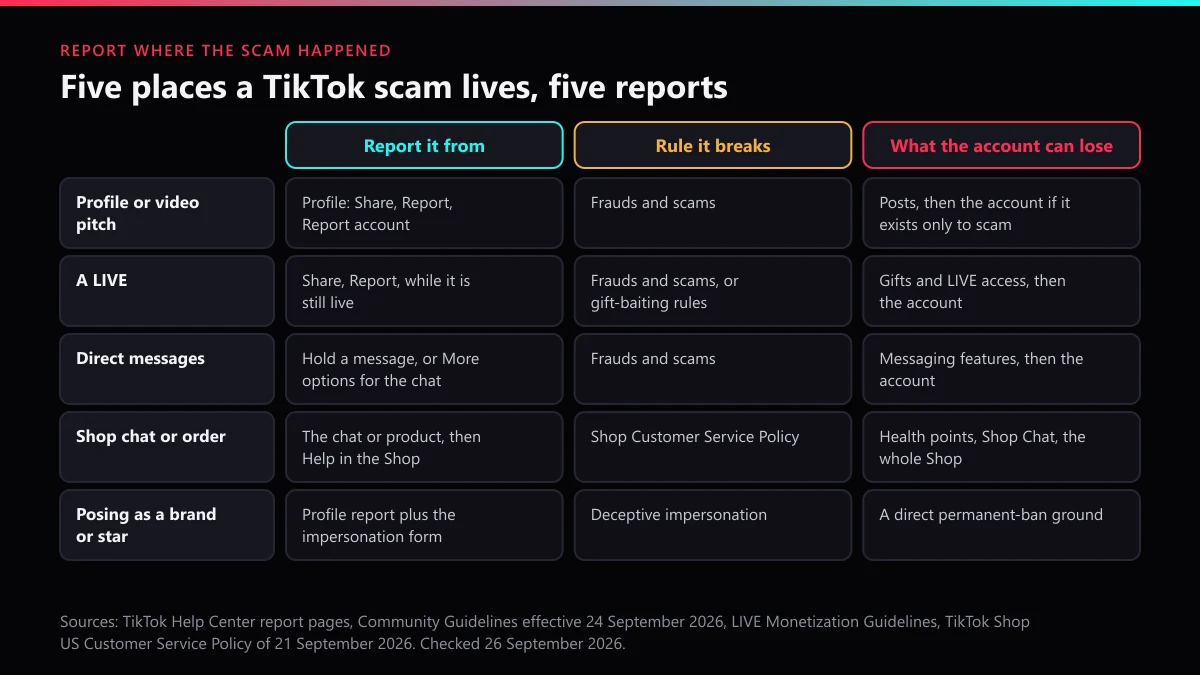
Report the account, not only the post. Open the scammer's profile, tap Share, then Report and Report account, choose the frauds and scams reason and submit. Then report the two or three clearest scam posts, messages or LIVEs. A post report removes a post; TikTok bans the account when it exists solely to break its rules.
Most people who ask us how to report a scammer on TikTok have already pressed Report once. Their flagged video is gone, sometimes within the hour, while the account that posted it stays up: live again that evening, sending the same "you've been selected" message to somebody else.
That outcome is not TikTok ignoring the report. It is TikTok answering a smaller question than the one you asked.
TikTok's own figures show the size of that gap. Between January and March 2026 it removed 8,987,893 videos and 6,958,932 comments under its Frauds and Scams policy, according to the policy data behind its Q1 2026 Community Guidelines Enforcement Report. Video removals rose by about half on the 5,969,245 of the quarter before. No matching figure is published for scam accounts banned. Videos are what TikTok counts, and a video is all a single post report reaches.
Why does a scam post come down while the scammer's account stays up?
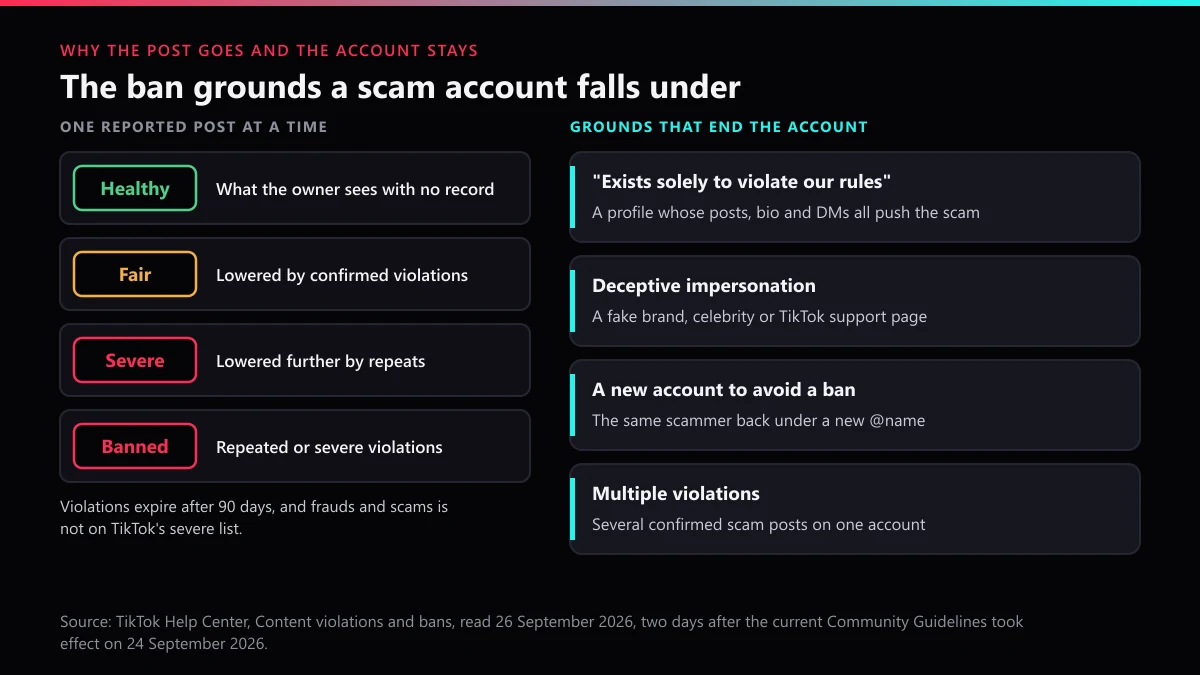
Because a post report is judged on that post alone, and frauds and scams is not on the short list of violations that end an account at the first offence. TikTok's Help Center page on content violations and bans describes an account status of Healthy, Fair, Severe or Banned, built from the owner's violation history over the last 90 days. Each confirmed violation lowers it; repeats can take away features such as commenting, and only then end in a permanent ban. A short, separate group ends an account on its own: child sexual abuse material, threats of violence, non-consensual sex acts, human trafficking and real-world torture. A fake investment pitch sits outside it, so a scammer who loses one video a week and lets each violation expire can keep the profile running for months.
That page also lists the grounds that do end an account, and four fit scam profiles closely. Report toward one of them and you are asking the right question.
| Ban ground in TikTok's words | What it looks like on a scam account | What to capture before you report |
|---|---|---|
| "Your account exists solely to violate our rules" | Every post, the bio link and the DMs push the same investment, giveaway or job offer | The profile link, three to five posts, the bio link, one DM with the payment request |
| Impersonating another person or entity "in a deceptive manner" | A copy of a celebrity, a brand or "TikTok Support" asking for money | The real account's link, and the impersonation form if it copies you or your brand |
| Another account used "to intentionally avoid restrictions or a permanent ban" | The same pitch, photos or payment handle under a new @name | Old and new profile links, the shared wallet, phone number or PayPal address |
| "Multiple violations of our policies" | Several scam posts already removed from one profile | Dated links to each post you reported |
When we reopened that Help Center page for this guide on 26 September 2026, it had changed since we last read it on 23 September. Its wording about warning strikes was gone. In its place were the four status levels and a new line: after certain first violations, the owner can complete optional in-app policy training and have eligible restrictions lifted, unless the violation was severe. New Community Guidelines had taken effect on 24 September 2026, two days earlier. For anyone reporting a scammer, that change points one way: a single removed post is even less likely to finish an account now.
Only TikTok can take the account away; nobody outside it can delete a profile, which is the point of deleting someone else's TikTok account. When the scam copies a real person or a brand, impersonation is the fastest of the four grounds, and the fake-account forms explain who may file. Volume changes none of this: ten reports of one post are one question asked ten times, as what report counts do shows with TikTok's enforcement figures.
Which scams do TikTok's rules actually cover?
More than most people expect. In the current guidelines, the Frauds and Scams section says TikTok doesn't allow "any attempts to scam, trick or defraud people", including impersonating a celebrity to sell something. Its not-allowed list names financial scams such as fake investment offers and get-rich-quick schemes, phishing and identity theft, job or transaction-related scams, teaching people how to scam, money muling, multi-level marketing, and trading fake currency, forged documents or stolen information. Multi-level marketing is the entry people miss: a recruitment video for a pyramid-style "business" is reportable under the same rule before anyone has lost a cent.
How to report a scammer on TikTok so the account itself is reviewed
Start from the profile, not from a video, because only the account report asks TikTok to judge the account as a whole. TikTok's Help Center gives one route for phone and web:
- Open the scammer's profile in the TikTok app. On the web, open it in your browser.
- Tap the Share button at the top of the profile. On the web, use More options instead.
- Tap Report, then Report account.
- Choose the frauds and scams reason, plus a subtopic if TikTok offers one.
- Tap Submit, then report the two or three posts that show the scam most plainly.
How do I report a scammer on TikTok when the pitch lives in a video rather than the bio? Press and hold the video, tap Report and choose the same reason. Screenshot first. A removed post takes your evidence with it, and a scammer who notices can block you, after which the profile vanishes from your view. Save the profile link, the @username and any payment details before you press anything.
Anyone trying to report a scammer on TikTok tends to pick the reason that feels closest, yet a fake giveaway filed as spam goes to a different review than one filed as a scam. Picking the report reason goes through the categories one by one. Rallying friends to report the same profile is the other common mistake, and what mass reporting an account really does explains why it adds nothing a single accurate report lacks.
How to report TikTok scammers who run several accounts
One account at a time, each with its own evidence, and a sentence tying them together. Scam operations rarely run one profile. A common set-up is a main account that posts plus three or four "support" or "manager" accounts that answer comments and pull people into DMs, so report each of them. When a banned profile reappears, the evasion ground applies: TikTok's Help Center says it may ban an account created or used to avoid a restriction on another, and that spreading violations across multiple accounts counts too. Reporting impersonation and ban evasion covers how to link the old account to the new one.
How do you report TikTok LIVE for scam, and what counts as a gifting scam?
Report it while it is still running, from inside the stream. The Help Center's steps for reporting a LIVE are app-only:
- Stay in the LIVE in the TikTok app.
- Tap Share.
- Tap Report, select a reason and, if prompted, a subtopic.
- Follow the steps and tap Submit.
Once the broadcast ends there is nothing for a reviewer to watch, so a screen recording made during the LIVE is worth more than any description afterwards. Then report the host's account from the profile, as above.
Your choice of reason decides which rule book reads the report. TikTok's LIVE Monetization Guidelines cover gift baiting: "misleading promises or artificial engagement exchanges to increase Gifts", playing on viewers' "emotions, sympathy, or sense of obligation", or asking for Gifts or financial aid through personal crowdfunding. They also cover pre-recorded, spliced and looping videos presented as live, which is how most fake crypto giveaway streams run. Their penalties aim at the money: a warning, a temporary cut from monetization features, or permanent loss of LIVE Gifts, LIVE Match and ranking features. A LIVE that promises to double your Gifts, pay you back in cash or send a prize for a donation has crossed from gift baiting into fraud, and belongs under the frauds and scams reason. TikTok's page on transaction policy violations covers the financial end: risky transactional activity can mean account deactivation, or a ban on sending or receiving LIVE Gifts, getting Coins and receiving reward payments.
A looped stream built from someone else's footage has a second route: the person who owns that footage can file a copyright complaint, as reporting stolen content explains. Profiles, clips, broadcasts and comments sit in separate review queues, which is why the four report queues matter here as well.
Can you report a TikTok LIVE gifting scam and get the Gifts back?
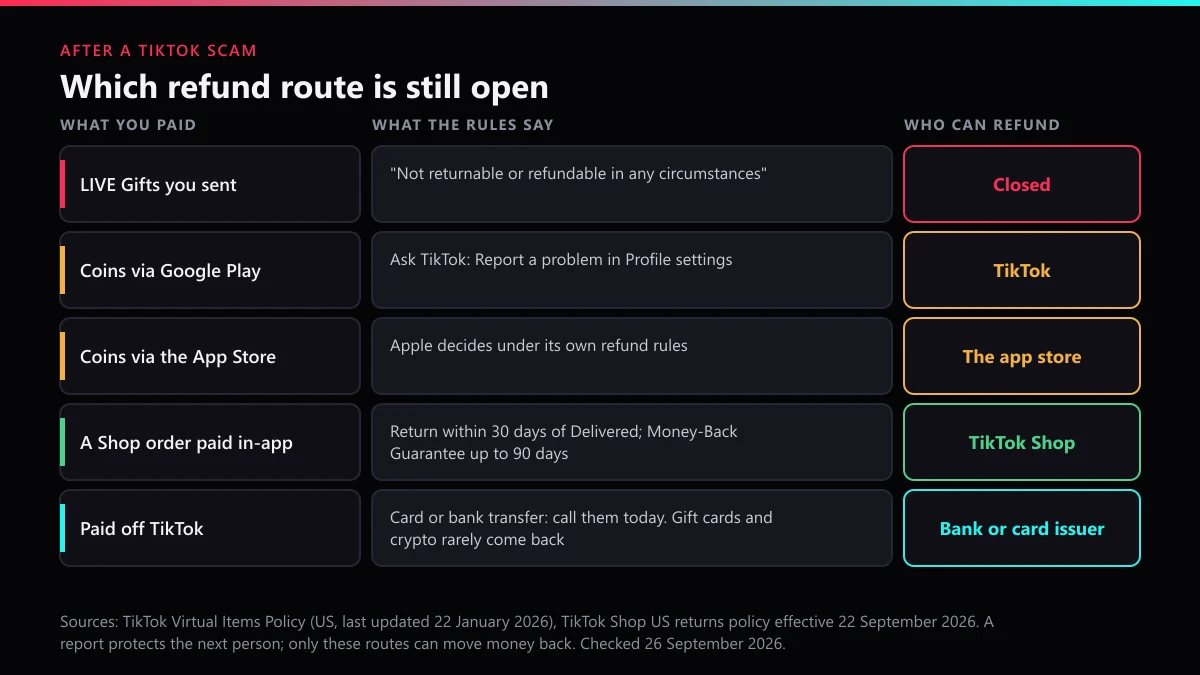
You can report it, but those Gifts are gone for good. TikTok's US Virtual Items Policy, last updated 22 January 2026, says that because Gifts are "consumed immediately upon activation, they are not returnable or refundable in any circumstances". Coins you bought but have not spent are a different matter. If you bought them through Google Play, the policy sends you to Report a problem in your profile settings. If you bought them through the Apple App Store or another store, that store handles the refund under its own rules.
A web form headed Report transaction issue sits at tiktok.com/legal/report/transaction. We opened it on 26 September 2026: it asks for an email address, the username and a free-text description, and makes you accept the Virtual Items Policy before you submit. It handles problems with your own Coins and payments. It is not a scam report and will not remove the host.
What should you report when the scammer moves into your DMs?
Report the whole chat from inside it, before the conversation leaves TikTok. Here is TikTok's route for reporting a direct message:
- Tap Inbox, then the chat.
- Press and hold one message to report just that message, or tap More options at the top to report the chat.
- Tap Report and select a reason.
- Tap Report and block, or Report, then Done.
Report and block does both in one step, the right choice once you know what you are dealing with. Job and "task" offers move off the app fastest of all DM scams. An FTC task-scam alert of 14 August 2025 describes the pattern: small payments of $5 to $20 to build trust, then crypto deposits to "unlock" the next set of tasks. Its advice is blunt: "Never pay anyone to get paid, or to get a job." TikTok's own scam guidance of 29 October 2025 tells users to think twice when someone urges them to move the conversation to another service.
There is a practical reason for that too. What happens on WhatsApp or Telegram is out of TikTok's reach, so the TikTok report has to rest on the part of the conversation that happened on TikTok. Screenshot it before you block, then report the WhatsApp number or Telegram account inside that app. If the chat turns into threats or demands over images, stop replying and go to the police; getting a TikTok taken down fast covers what you can remove yourself while that happens.
How do you report a TikTok Shop scam when the seller wants paying outside the app?
Report the Shop Chat conversation and the product, then contact TikTok Shop support from Help with the order number, and do not send the extra money. A seller who asks for it has already broken TikTok Shop's rules in writing. Its US Customer Service Policy, updated 21 September 2026, says sellers "are strictly prohibited from soliciting additional payments for purchases made on TikTok Shop, either on-platform or offline". It also bars sending bank or third-party payment accounts, offering off-platform returns or refunds, and asking customers to cancel orders outside TikTok Shop's processes. Enforcement runs from lost Account Health Rating points and blocked messages up to shop deactivation.
That is why the chat matters more than your description of it. A request for a "customs fee" or a deposit inside Shop Chat sits in TikTok Shop's own system, where it can be read. Once you move to text messages, nobody at TikTok can see it. Creators who promote products face the same rule from the other side: TikTok Shop's guidance on redirecting traffic, dated 22 June 2026, warns that "when users are directed outside of TikTok shop, we can no longer guarantee a safe and secure experience", and lists "Place your deposit to this number" as an example of a banned call to action.
So how to report a scammer on TikTok Shop comes down to three pieces: the chat, the product listing, and the order. To report a scam on TikTok Shop through the product itself, the three-dots menu on the listing is the entry point; the steps, the seller's health score and what a Shop "ban" means are on getting a TikTok Shop seller removed. Keep the refund request moving at the same time. In the US, a return is due within 30 calendar days of Delivered, and the Money-Back Guarantee reaches 90 days for damaged, defective or not-as-described items.
TikTok scammer report email, number or online form: what actually exists
No phone line and no email inbox take scam reports. TikTok's routes are the Report button in the app and a small set of web forms, and at least two of those open without a login.
| Route | Use it for | What it needs |
|---|---|---|
| Report in the app | A profile, post, LIVE, comment or chat you can see | A TikTok account; LIVE reports are app-only |
| Online report form (tiktok.com/legal/report/feedback) | A scam account when you have no TikTok account, or cannot see the profile | No login; the profile link |
| Report transaction issue (tiktok.com/legal/report/transaction) | Your own Coins, Gifts and payments | No login; your email and username |
| Impersonation forms, US and outside the US | A scam account posing as you or your brand | Proof of identity or authority |
| Report illegal content (EEA only) | Financial crime and other illegal content in the EU | The country where it is illegal |
No tiktok scammer report number exists, whatever search results suggest, and a site listing a "TikTok fraud line" is fishing for the people it claims to help. Email is no different. TikTok's page on avoiding phishing says it "will never contact you to ask for your password, verification codes, or other sensitive personal information", and names only two ways it reaches out: an in-app inbox notice about a feature problem such as a Coins recharge, with a pop-up you must accept, and @tiktok.com email about verified badges for government and political accounts. A copyright@tiktok.com address does exist as TikTok's DMCA agent, for copyright notices only. For a tiktok scammer report online, use the feedback form. Submitting and escalating a TikTok report walks through the web forms, and a scam that reached you as a paid advertisement has its own route in the takedown notice guide.
Where else should a TikTok scam be reported once money has gone?
Your bank or card issuer comes first, the same day, because TikTok can remove an account but cannot pull back a payment made outside it. Card payments are the most recoverable. A Which? reader who paid about £150 to a fake shop found on TikTok had a full refund within a week through a chargeback, the consumer group reported on 28 January 2026. Bank transfers, gift cards and crypto come back far less often, and every day of delay makes it harder.
Then file the fraud report for your country. None of these bodies will remove a TikTok account, but they collect the pattern that builds cases against repeat operators:
- United States: the FTC at ReportFraud.ftc.gov. For 2025 it logged about 3 million fraud reports and $15.9 billion in losses, it told Congress on 25 March 2026. Its Data Spotlight of 27 April 2026 adds that one in three people who lost money to a job or business-opportunity scam in 2025 said it started on social media. Crypto and larger losses also go to the FBI's IC3.
- England, Wales and Northern Ireland: Report Fraud, which replaced Action Fraud on 4 December 2025, online or on 0300 123 2040. In Scotland, call Police Scotland on 101. UK Finance counted 248,070 authorised push payment fraud cases in 2025, and 66% of them started online.
- European Union: TikTok's Report illegal content route, which has a financial-crime category. Under Article 16 of the Digital Services Act, TikTok must tell you its decision and how to challenge it.
Expect a second approach after the first scam. Accounts that comment "I got my money back, message this recovery expert" under scam-warning videos are part of the same trade. In its 2025 Internet Crime Report the FBI counted more than 10,500 complaints about recovery scams, with about $1.4 billion lost, and an IC3 alert of 20 July 2026 repeats that IC3 will never "refer someone to a company requesting payment for recovering funds". Paid offers to "get the scammer banned" deserve the same scepticism: what report bots actually ship shows why volume tools fail, and what a removal fee pays for sets out what honest help can sell.
What does TikTok Ban Service check before filing a scam takedown?
Where the scam happened, which ban ground it fits, and whether your money still has a route back. TikTok Ban Service reads the evidence in that order. A giveaway pitch in the bio and a payment request in the DMs point to the "exists solely" ground and an account report. A copied brand points to the impersonation form. A seller asking for a deposit in Shop Chat points to TikTok Shop, and the refund request goes in first, since a return window closes and a report does not.
We also turn cases down. An honest seller who shipped a disappointing product gets a return, not a report. A rival creator you suspect of running a scam, with nothing on screen to show it, stays where they are: reports against accounts that break no rule go against TikTok's own rules and leave the target untouched. TikTok Ban Service files and escalates the report; TikTok makes the final decision, and it may take no action. A profile that vanishes after you report it may simply have been deleted by its owner, which on TikTok starts a 30-day deactivation, as deleting a TikTok account explains.
Screenshot the pitch and the payment request today. Report the account from its profile, then the clearest posts, the LIVE while it runs, and the chat before you block. If the account is still up after that and the evidence is on your screen, send us the link and we will tell you which route fits before anything is filed. Our solutions overview lists the other violation types we handle.
FAQ
Will a TikTok scammer find out that I reported them?
Not from a Community Guidelines report. TikTok tells the account owner which rule a removal broke, without the reporter's name. Two routes work differently: an impersonation form and a copyright complaint are filed under your own identity, so use them only when the scam copies you, your brand or your work.
Can I report a scam on TikTok without an account?
Yes: TikTok's online report form at tiktok.com/legal/report/feedback opened without a login when we checked it in September 2026, and its Report a potential violation topic splits into content and account violations. Paste the scam account's profile link into it.
Does reporting a scam account many times get it banned faster?
No. Each report asks for a review against the rules. A reviewer who has already confirmed or rejected the violation reaches the same answer the tenth time. What changes the outcome is a report on the right object with evidence: the profile for an account that exists only to scam, the chat for a DM scam, the order for a Shop seller.
The scam account came back under a new username. What do I report?
Report the new account and say it belongs to the same person. TikTok's Help Center lists creating or using another account to avoid a restriction or permanent ban as a ground for banning it, and spreading violations across several accounts counts too. Matching payment handles, phone numbers or reused photos are the evidence that links them.
TikTok said the scam video had no violation. What now?
Change what you report rather than repeating it, because a clip that only hints at the scam can pass review while the DM or bio link that takes the money would not. Report the chat or the whole account with the payment request in view; in the EU, the Report illegal content route under the Digital Services Act also gives you a decision you can appeal.
Someone offers to recover the money I lost to a TikTok scammer. Should I pay?
No. Recovery offers that arrive after a scam are a second scam aimed at the same victim, and the FBI counted about $1.4 billion lost to them in 2025. IC3 says it will never refer anyone to a company that asks for payment to recover funds. Your bank, your card issuer and a police report cost nothing.
Is a TikTok DM saying I won a giveaway a scam?
Almost always, when it asks you to click a link, pay a fee or hand over a login code. TikTok says it will never contact you to ask for your password or verification codes, and its phishing page warns against third-party sites promising free likes, fans or Coins. Report the message from the chat, then block the sender.