4 October 2026 · TikTok Ban Service · 12 min read
How to un-report a video on TikTok after an accidental report
You can't un-report a video on TikTok. Once you tap Submit there is no withdraw, cancel or undo option, and none of TikTok's 52 privacy and safety articles describes one. The report asks for a review: a video that breaks no rule stays up, gets no strike, and TikTok says it won't tell the creator who reported it.
On TikTok the Report option lives in the same Share sheet you open to send a video to a friend, so mis-taps are common. Bad news first: nothing in the app takes a report back.
We checked that claim at the source on 4 October 2026. We had the Help Center's own article feed return every article in its privacy and user safety section, all 52 of them, and searched each one for withdraw, cancel, undo, retract and mistake. "Mistake" turns up again and again, and almost always on the creator's side of the fence, as in "if you believe we've made a mistake" followed by an appeal button. "Retracted" turns up exactly twice, in the copyright and trademark articles. No article gives the person who filed a report any way to pull it back. A handful of third-party guides describe an Undo Report button reached through your watch history; TikTok's own text never mentions one, and we did not sign in to an account to test it, so treat that claim as unconfirmed.
How to un-report a video on TikTok when there is nothing to press?
You can't, because TikTok gives the reporter no recall step. TikTok's official instructions for reporting a post stop at Submit: tap Share or press and hold the video, tap Report, pick a reason and a subtopic if asked, then Submit. There is no fourth screen.
So the honest reply to how to un report a video on TikTok, or how to cancel a report on TikTok, is that the report has already done the only thing it can do. It put one video in front of a reviewer. If your own screen happens to show an undo prompt in the second after you submit, use it, but don't go hunting through settings for one.
One tempting fix makes things worse. Filing a second report that says "ignore my last one" is still a report, so the same video gets queued for review again. Leave it alone.
What happens after you accidentally reported a TikTok video?
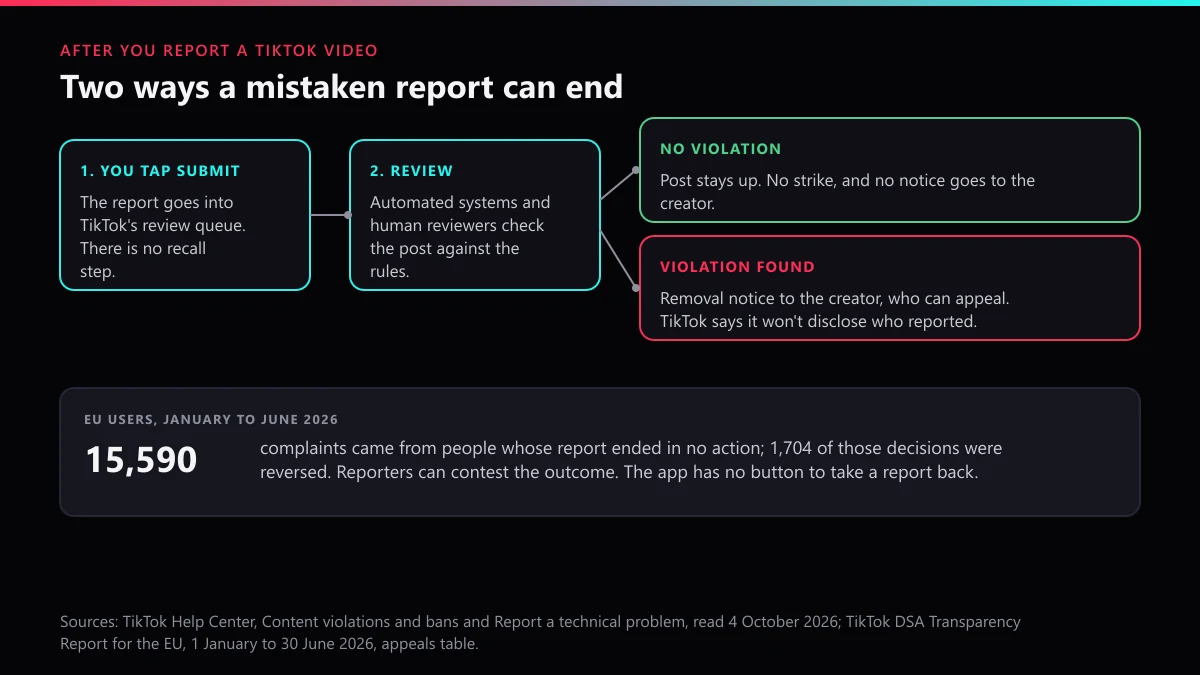
A clean video comes out of review exactly as it went in. TikTok's help page on content violations and bans says it uses "both automated and human reviews" and that content can be reviewed "when you upload content, if it gains popularity, or if it's reported." Your tap is one of three triggers, and the other two run whether you report or not. TikTok's Community Guidelines enforcement report for January to March 2026 puts its proactive removal rate at 99.3%, meaning almost every video it took down was caught before anyone reported it.
That page also sets the condition for any consequence: "If we find violations and take action, the account owner will be notified." No violation, no action, no notice. It keeps its place in the feed, and the creator gets no strike. Nor does the reason you picked change that. Choosing "Harassment" for a cooking video does not invent a harassment violation; the reviewer checks the video against TikTok's rules, and a cooking video breaks none of them.
If the reviewer does find something, the removal comes from what the creator posted, not from your report. That is the case where the report was not a mistake at all.
I accidentally reported someone on TikTok: will they know it was me?
Not from TikTok. The Help Center article on reporting a problem says "TikTok will not disclose your identity to the person you report," and the page on reporting other issues repeats the promise for content and accounts. There is one trailing clause worth reading, though: TikTok "may disclose information where required by law or where necessary to review, investigate, or respond to your report."
EU users get a second layer. Under Article 17 of the Digital Services Act, the statement of reasons a platform sends to a creator says whether a decision followed a notice, and gives the identity of the notifier only "where strictly necessary". A thumb-slip on a friend's dance video is nowhere near that bar.
Copyright is the exception people miss. TikTok's copyright webform warns that the filer's contact information "may be shared with the person who posted the content." An in-app report stays anonymous; a legal notice may not.
Which mistaken reports can be partly reversed?
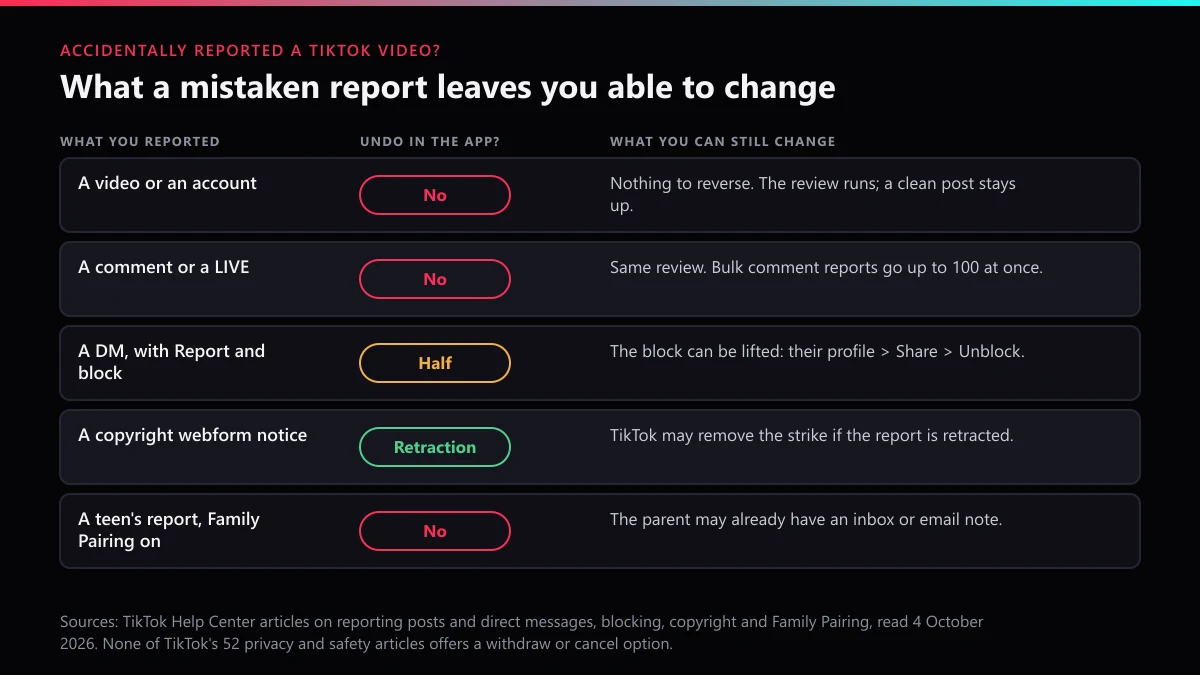
Only two of the common slips leave you something to change, and neither of them is a plain video report. This table sorts them by what you actually tapped.
| What you reported | Undo inside TikTok? | What is still in your hands |
|---|---|---|
| A video, from Share or a long press | No | Nothing to reverse. It gets reviewed, and a clean one stays up. |
| An account, from profile > Share > Report account | No | Same review, applied to the profile. No violation means no restriction. |
| A comment, or up to 100 comments in bulk on your own post | No | Clean comments stay. Bulk reporting your own commenters by mistake changes nothing for them unless they broke a rule. |
| A LIVE | No | The host keeps streaming unless the review finds a violation. |
| A DM, with Report and block | The block, yes | Open their profile, tap Share, then Unblock. Your report stays. |
| A copyright or trademark webform notice | Retraction | Write to TikTok's IP team and withdraw it (see the copyright section below). |
| A teen's report with Family Pairing alerts on | No | The parent may already have an inbox or email note, so explain it to them. |
People get the DM row wrong most often. TikTok's direct-message report screen offers "Report and block" next to plain "Report," and the first choice does two things. Only the block is reversible. And if you meant to report the account rather than one video, our page on choosing between an account report and a video report shows what each one sends.
How to delete or remove a report on TikTok from your Safety Center?
Not with anything TikTok documents. Its Help Center says the app version of the Safety Center holds "records of any reports you've submitted," reached through Profile, the Menu ☰ button, Settings and privacy, Support, then Safety Center. No delete or hide control is described for that list.
So how to delete a report on TikTok and how to remove a report on TikTok end in the same place. Your entry stays, and the review result lands next to it.
How to take back a report on TikTok when it was a copyright notice?
Retract it. Copyright and trademark notices are the one report type TikTok's own text says can be pulled back. Its Help Center copyright article says TikTok "may also remove strikes if the copyright infringement report is retracted or your appeal is approved." The trademark article carries the same sentence.
That matters because a copyright report is a legal notice rather than a tap. The webform asks you to verify an email first, make three statements and sign with your full legal name, and three copyright strikes end an account. If you filed one against the wrong video, retract it rather than hope the reviewer throws it out. TikTok publishes no retraction form. The address it registered with the US Copyright Office as its DMCA agent is copyright@tiktok.com, so our advice is to write from the email you verified on the form, list the reported link and the date you filed, and say plainly that you withdraw the notice. Our explainer on how a formal takedown notice works covers what that notice set in motion, and the guide to reporting stolen content on TikTok shows what a correct one looks like.
What should you do in the first ten minutes after a mistaken report?
- Stop reporting. A second report filed to "correct" the first one is a fresh review request.
- Undo the block if you blocked. From a DM "Report and block," go to their profile, tap Share, then Unblock.
- Find the record. Profile, Menu ☰, Settings and privacy, Support, Safety Center. That list is where the outcome shows up.
- Tell the person, if it was a friend. TikTok won't name you, so a message from you is the only way they hear it was an accident. If a post of theirs is ever removed, the notice comes with an appeal button.
- Write to support only if you want it on record. Settings and privacy, then Report a problem; at "Is your problem resolved?" choose No, then Need more help. TikTok makes no promise to stop a review on request, and the same help article notes that only TikTok's own Support team handles these, so ignore anyone in your DMs offering to "cancel" the report for you.
Can one accidental report get your own account restricted?
One honest slip, no. What platforms police is a pattern. TikTok's US Terms of Service, section 3.4, bars using the platform to submit "reports, notices or complaints which are unfounded," and in the EU, Article 23 of the Digital Services Act lets a platform suspend, after a prior warning and for a reasonable period, the processing of notices from someone who frequently files manifestly unfounded ones. Frequently is the operative word; a single mis-tap on a friend's video does not come close.
| Signal | One accidental report | Coordinated false reporting |
|---|---|---|
| Pattern | One tap on one post | The same ill-fitting reason, filed again and again, often from many accounts |
| What it sets off | One review that finds nothing | Repeated reviews that keep finding nothing |
| Risk to the reporter | None in TikTok's published rules | A breach of Terms section 3.4; in the EU, suspended notice processing after a warning |
Deliberate false reporting is a different story, and it is where most of the "report" traffic on TikTok really comes from. Mass report bots and spam report bots fire the same false reason from dozens of accounts. Pages selling an account report bot promise bans the count can't deliver, which we break down in what a mass report tool really does on TikTok and in how many reports it takes to delete an account. Our piece on mass reporting and impersonation shows how often those two travel together, and paying someone for TikTok account removal covers what buyers usually end up with. Against that background, an accidental report is noise.
EU figures show what reporters can do instead of withdrawing. TikTok's DSA transparency report for January to June 2026 lists 15,590 complaints from people whose notice ended in no action, and 1,704 of those decisions, about 10.9%, were reversed. Reporters can contest an outcome. Nobody can take a report back.
What if the video you reported really did break the rules?
Then leave the report where it is and make the next one count. Picking the closest reason is most of the job, and our guide to which violation category fits maps TikTok's reasons to real cases. For one post, follow how a correct video report is filed; for a full ticket with links and screenshots, see submitting a report through TikTok's form.
Some cases need their own route. Abuse aimed at a person goes through reporting harassment on TikTok; a copycat profile goes through reporting a fake TikTok account; a scam storefront calls for getting a TikTok Shop listing removed. If the account was squatting on your name, go for claiming the TikTok username instead of reporting anything. When harm is ongoing, the fastest legitimate routes beat any report count, and what actually gets an account banned explains why one strong report outweighs twenty weak ones.
Two things no report does: it can't delete anyone's profile, which deleting someone else's TikTok account explains, and only the owner can follow the steps for deleting your own TikTok account. Don't pile more reports onto a case that needs a full account takedown. Browse all of our TikTok reporting guides, start with the TikTok Ban Service home page, or contact our team with the links and the posts.
FAQ
How to un-report a TikTok account you reported by mistake?
You can't, any more than you can for a video. An account report sends the profile to review; if nothing on it breaks a rule, the account is not restricted and its owner gets no notice. If you also blocked them, open their profile, tap Share, then Unblock.
Can you un report someone on TikTok if you picked the wrong person?
No. The report on the wrong person stays filed and their content goes through the normal review, which ends with no action if it is clean. Then report the account you actually meant, choosing the reason that matches what it posted.
Can you undo a report on TikTok before the review starts?
No. Timing makes no difference, because TikTok offers no recall at any stage, before or during review. The outcome depends on what the content shows, not on how quickly you regret the tap.
Does TikTok tell you what happened to a report you filed?
Often, yes. The app version of the Safety Center keeps records of reports you've submitted, under Settings and privacy, Support, Safety Center. In the EU, TikTok's illegal-content page says people who report suspected illegal content are notified of the decision, including when TikTok finds the content is not illegal.
Will an accidental report give the creator a strike?
Only if the content really breaks a rule, and then the strike comes from that violation, not from your report. A video that passes review gets no strike, nothing about it is restricted, and its owner is not notified.
I accidentally reported a TikTok LIVE. Will the stream be stopped?
Not because of a mistaken report. TikTok's Community Guidelines say a LIVE may be stopped, and its host temporarily restricted from going LIVE, when the session breaks the rules. A stream that breaks nothing keeps running.
How to withdraw a report on TikTok if you live in the EU?
EU law does not add a withdraw option. The Digital Services Act gives people who file a notice the right to complain about the decision on it, not to recall it. TikTok's EU report for January to June 2026 counts 15,590 such complaints after a no-action decision.
How to cancel a report on TikTok that went through the online form?
The web form has no cancel step either. Its own page says the information you share will only be used to respond to your report, so if you gave an email address, the reply thread is the natural place to add a note that the report was a mistake. TikTok makes no promise to stop a review because of it.